Dynamic Bots - Usage Documentation
Note
Available for RDA versions 8.2 and Above.
Overview
The Mako Code Executor is a dynamic bot execution framework that allows user's to create, store, and execute custom data processing logic using Mako templates. Bot definitions are stored in a persistent stream (pstream) and can be invoked dynamically with parameters.
Table of Contents
- Basic Usage
- Bot Configuration
- Allowed Imports
- Secure Credential Access with Wrapper Modules
- Variables Available in Mako Templates
- Setting Output
- Using as a Data Source
- Using as a Sink (with Input DataFrame)
- Parameter Validation with JSON Schema
- Credentials Management
- Complete Example
1. Basic Usage
1.1 As a Source (get_data)
@dm:dynamic-bot bot_name="all-pstream-stats" secret_name is "api-cred-131-35" host is "192.168.131.35"
1.2 As a Sink (update_data) - Processing Input DataFrame
2. Bot Configuration
Bot definitions must be stored in a pstream (default: cfx_bots_registry) with the following structure:
2.1 Required Fields
| Field | Type | Description |
|---|---|---|
bot_name |
string | Unique identifier for the bot |
mako_template |
string | The Mako template code to execute |
version |
string | Version identifier (e.g., "1.0.0") |
default_version |
boolean | Set to true for the default version |
2.2 Optional Fields
| Field | Type | Description |
|---|---|---|
json_schema |
object/string | JSON Schema for parameter validation |
imports |
array | List of Python modules to import |
allowed_credential_types |
array | List of credential types the bot can access |
3. Allowed Imports
The imports field in your bot configuration controls which Python modules are available in your Mako template. This is a security feature that restricts what code can be executed.
3.1 Import Restrictions
Important
Only the following modules are allowed by the MakoCodeExecutor framework:
| Module | Description | Usage |
|---|---|---|
pandas |
Data manipulation and analysis | Data processing, DataFrames |
numpy |
Numerical computing | Array operations, mathematical functions |
re |
Regular expressions | Pattern matching, text processing |
json |
JSON encoding/decoding | Parse/generate JSON data |
datetime |
Date and time handling | Timestamps, date operations |
rda_requests |
Secure HTTP client wrapper | API calls with credential management |
rda_paramiko |
Secure SSH client wrapper | SSH connections with credential management |
rda_logging |
RDAF logging framework | Structured logging |
rda_pathlib |
Restricted filesystem path operations | Sandboxed file access with RestrictedPath |
Any other imports will be rejected during bot verification.
Note
More modules may be allowed in future after review.
3.2 Import Configuration Format
The imports field is an array of import specifications:
"imports": [
    {"module": "module_name"},
    {"module": "module_name", "as": "alias"},
    {"module": "package.submodule"},
    {"module": "package.submodule", "as": "alias"}
]
Remember
Only modules from the allowed list above can be imported. For example:
✅ Valid: {"module": "pandas", "as": "pd"}
✅ Valid: {"module": "rda_requests", "as": "requests"}
✅ Valid: {"module": "rda_pathlib"} with {"items": {"RestrictedPath": "Path"}}
❌ Invalid: {"module": "requests"} (not in allowed list, use rda_requests)
❌ Invalid: {"module": "pathlib"} (not in allowed list, use rda_pathlib)
❌ Invalid: {"module": "os"} (not in allowed list)
3.3 Examples
3.3.1 Basic Import
In your template, these are available directly:
3.3.2 Import with Alias
In your template:
3.3.3 Secure Wrapper Imports (Recommended)
"imports": [
    {"module": "rda_requests", "as": "requests"},
    {"module": "rda_paramiko", "as": "paramiko"},
    {"module": "rda_pathlib", "items": {"RestrictedPath": "Path"}}
]
In your template:
<%
# Secure HTTP requests
session = requests.Session()
response = session.get(url, rda_secret_name=secret_name)

# Secure SSH connections
ssh = paramiko.SSHClient()
ssh.connect(host, rda_secret_name=secret_name)

# Secure file operations (sandboxed to /var/dynamic_bots)
file_path = Path("data/output.txt")
file_path.write_text("Hello, World!")
%>
3.4 Using rda_pathlib for Safe File Operations
The rda_pathlib module provides RestrictedPath - a sandboxed filesystem interface that prevents directory traversal attacks and restricts file operations to a safe sandbox.
3.4.1 Key Features
- Sandboxed Access: All file operations are restricted to
/var/dynamic_bots/ - Auto-Creation: Sandbox directory is automatically created if it doesn't exist
- Path Traversal Prevention: Attempts to access parent directories or use
..are blocked - Symlink Protection: Symlinks are not followed by default
- Similar API to pathlib: Familiar
Path-like interface - Explicit Blocking: Dangerous operations like
rename(),chmod(), and symlinks are explicitly blocked
3.4.2 Configuration
3.4.3 Usage Examples
<%
# Create a path within the sandbox
file_path = Path("output/data.json")

# Write data
data = {"result": "success", "count": 100}
file_path.write_text(json.dumps(data))

# Read data back
content = file_path.read_text()
loaded_data = json.loads(content)

output["value"] = [loaded_data]
%>
<%
config_file = Path("config/settings.json")

if config_file.exists():
    settings = json.loads(config_file.read_text())
else:
    settings = {"default": True}

output["value"] = [settings]
%>
<%
# Build paths safely
base = Path("reports")
date_path = base / "2025" / "01" / "report.csv"

# Get path info
logger.info(f"Path name: {date_path.name}")
logger.info(f"Path parent: {date_path.parent}")
logger.info(f"Path suffix: {date_path.suffix}")

# Check file/directory type
if date_path.exists():
    if date_path.is_file():
        logger.info("It's a file")
    elif date_path.is_dir():
        logger.info("It's a directory")

output["value"] = [{"path": str(date_path)}]
%>
<%
# Create directory structure
reports_dir = Path("reports/2025/01")
reports_dir.mkdir(parents=True, exist_ok=True)

# List directory contents
data_dir = Path("data")
if data_dir.exists() and data_dir.is_dir():
    files = []
    for item in data_dir.iterdir():
        files.append({
            "name": item.name,
            "is_file": item.is_file(),
            "is_dir": item.is_dir()
        })
    output["value"] = files
else:
    output["value"] = []
%>
<%
# Get file stats
file_path = Path("data/input.json")
if file_path.exists():
    stats = file_path.stat()
    info = {
        "size": stats.st_size,
        "modified": stats.st_mtime,
        "is_file": file_path.is_file()
    }

    # Delete file if needed
    # file_path.unlink()  # Removes the file

    output["value"] = [info]
else:
    output["value"] = [{"error": "File not found"}]
%>
3.4.4 Security Restrictions
| Allowed Operations | Blocked Operations |
|---|---|
• Read/write files within /var/dynamic_bots/• Create directories with mkdir()• List directory contents with iterdir()• Check status with exists(), is_file(), is_dir()• Get file statistics with stat()• Delete files with unlink()• Path manipulation (join, name, parent, etc.) • Read/write text and bytes |
• Access to files outside /var/dynamic_bots/ sandbox• Path traversal with .. or absolute paths• Following symlinks (disabled by default) • rename() - explicitly blocked• replace() - explicitly blocked• chmod() - explicitly blocked• symlink_to() - explicitly blocked• hardlink_to() - explicitly blocked• Direct use of os or shutil modules |
3.4.5 Security Error Examples
<%
# Path traversal - raises PermissionError
dangerous_path = Path("../../etc/passwd")
dangerous_path.read_text()  # ❌ Error: Access outside sandbox not allowed
%>
Error message:
<%
# Blocked operation - raises PermissionError
file_path = Path("data/file.txt")
file_path.rename("data/newname.txt")  # ❌ Error: rename() is not allowed
%>
Error message:
3.5 Commonly Used Module Combinations
Here are commonly used module combinations for different bot purposes:
3.5.1 Data Processing Bots
"imports": [
    {"module": "pandas", "as": "pd"},
    {"module": "numpy", "as": "np"},
    {"module": "json"},
    {"module": "datetime"}
]
3.5.2 API Integration Bots
"imports": [
    {"module": "rda_requests", "as": "requests"},
    {"module": "json"},
    {"module": "rda_logging.rda_logger", "as": "logging"}
]
Note
Use rda_requests instead of plain requests for secure credential handling via rda_secret_name.
3.5.3 SSH Automation Bots
"imports": [
    {"module": "rda_paramiko", "as": "paramiko"},
    {"module": "json"},
    {"module": "rda_logging.rda_logger", "as": "logging"}
]
3.5.4 Data Transformation Bots
"imports": [
    {"module": "pandas", "as": "pd"},
    {"module": "json"},
    {"module": "re"},
    {"module": "datetime"}
]
3.6 Security Enforcement
The MakoCodeExecutor framework enforces strict import restrictions:
| Allowed Modules (Whitelist) | Blocked Modules |
|---|---|
| Only these 9 modules can be imported: • pandas, numpy, re, json, datetime• rda_requests, rda_paramiko, rda_logging, rda_pathlib |
All other modules are blocked, including: • Process Execution: subprocess, os.system, commands• Direct HTTP: requests, httpx, urllib3 (use rda_requests)• Direct SSH: paramiko (use rda_paramiko)• File System: os, shutil, glob, pathlib (use rda_pathlib)• Code Execution: eval, exec, compile, importlib• Network: socket, ftplib, telnetlib, urllib• System Access: sys, platform, ctypes• Cloud SDKs: boto3, google-cloud-*, azure-*• Databases: pymongo, psycopg2, mysql-* |
3.5.5 Verification Error Example
If you try to import a non-allowed module:
You'll receive an error during bot verification:
Exception: Module import is not allowed for these: os, only allowed are pandas, numpy, re, json, datetime, rda_requests, rda_paramiko, rda_logging, rda_pathlib
3.5.6 Best Practices
- Only import what you need: Don't import modules you don't use
- Use secure wrappers: Always use
rda_requestsandrda_paramikoinstead of direct alternatives - Validate your imports: Test bot verification before deployment
- Keep it simple: The restricted import list is designed for safe data processing
- Check the whitelist: Always verify your module is in the allowed list before using it
3.7 Import Error Handling
If a module import fails during template verification, you'll receive an error:
Error: Module Not in Whitelist
Exception: Module import is not allowed for these: requests, pathlib, only allowed are pandas, numpy, re, json, datetime, rda_requests, rda_paramiko, rda_logging, rda_pathlib
Solutions:
- ✅ Use the allowed alternative: Replace
requestswithrda_requests,pathlibwithrda_pathlib - ✅ Check the module name spelling
- ✅ Verify the module is in the whitelist (see table above)
- ❌ You cannot add new modules to the whitelist - this is a security restriction
3.8 Complete Import Examples
{
  "bot_name": "api_collector",
  "imports": [
    { "module": "rda_requests", "as": "requests" },
    { "module": "json" },
    { "module": "rda_logging.rda_logger", "as": "logging" },
    { "module": "datetime" }
  ]
}
Template usage:
<%
logger = logging.getLogger("api_collector")

# Create session - uses rda_requests wrapper
session = requests.Session()

# Make API request with secure credential loading
response = session.get(
    f"https://{host}/api/data",
    rda_secret_name=secret_name,
    timeout=30,
    verify=False
)

# Parse response
data = response.json()

# Add timestamp
data['collected_at'] = datetime.datetime.now().isoformat()

# Return results
output["value"] = data
%>
{
  "bot_name": "data_normalizer",
  "imports": [
    { "module": "pandas", "as": "pd" },
    { "module": "numpy", "as": "np" },
    { "module": "re" }
  ]
}
Template usage:
<%
# Use pandas for data manipulation
df_clean = df.copy()

# Remove special characters using regex
df_clean['name'] = df_clean['name'].apply(lambda x: re.sub(r'[^a-zA-Z0-9\s]', '', x))

# Normalize numeric columns using numpy
numeric_cols = df_clean.select_dtypes(include=[np.number]).columns
for col in numeric_cols:
    df_clean[col] = (df_clean[col] - df_clean[col].mean()) / df_clean[col].std()

# Return normalized data
output["value"] = df_clean
%>
{
  "bot_name": "ssh_command_executor",
  "imports": [
    { "module": "rda_paramiko", "as": "paramiko" },
    { "module": "json" },
    { "module": "rda_logging.rda_logger", "as": "logging" }
  ]
}
Template usage:
<%
logger = logging.getLogger("ssh_executor")

# SSH connection with secure credential loading
ssh = paramiko.SSHClient()
ssh.connect(host, rda_secret_name=secret_name)

# Execute command
stdin, stdout, stderr = ssh.exec_command(command)
output_data = stdout.read().decode()
error_data = stderr.read().decode()

ssh.close()

# Return results
result = {
    "output": output_data,
    "error": error_data,
    "command": command
}

output["value"] = [result]
%>
{
  "bot_name": "file_processor",
  "imports": [
    { "module": "rda_pathlib", "items": {"RestrictedPath": "Path"} },
    { "module": "pandas", "as": "pd" },
    { "module": "json" }
  ]
}
Template usage:
<%
# Process input data and save to file
input_file = Path("input") / f"{file_name}.json"
output_file = Path("output") / f"{file_name}_processed.json"

# Read input if exists
if input_file.exists():
    data = json.loads(input_file.read_text())
else:
    data = {"status": "new_file"}

# Process data
data["processed"] = True
data["timestamp"] = datetime.datetime.now().isoformat()

# Write output (creates directory if needed)
output_file.write_text(json.dumps(data, indent=2))

# Return result
output["value"] = [{
    "input_file": str(input_file),
    "output_file": str(output_file),
    "status": "success"
}]
%>
4. Secure Credential Access with Wrapper Modules
4.1 Why Use Wrapper Modules?
The new architecture prevents templates from: - Accessing raw credentials directly - Performing unrestricted file system operations - Escaping sandbox restrictions
Instead, secure wrapper modules (rda_requests, rda_paramiko, and rda_pathlib) provide controlled, sandboxed access.
4.2 Key Benefits
- Enhanced Security: Templates never see raw credential data or access files outside sandbox
- Simplified Code: No manual credential parsing or path validation
- Consistent Pattern: Use
rda_secret_namefor credentials,RestrictedPathfor files - Vault Integration: Automatic credential loading from the vault
- Sandbox Protection: File operations restricted to safe directories
4.3 Quick Start
For HTTP/API calls, use rda_requests:
<%
session = requests.Session()
response = session.get(url, rda_secret_name=secret_name, verify=False)
%>
For SSH connections, use rda_paramiko:
For file operations, use rda_pathlib:
See the Credentials Management section for detailed usage.
5. Variables Available in Mako Templates
When your Mako template executes, the following variables are available in the execution context:
5.1 Template Parameters (from JSON Schema)
Any parameters defined in your JSON schema and passed during invocation are available as variables:
<%
# If you pass host="192.168.131.35" and secret_name="api-cred-131-35"
# These are directly accessible as variables:
url = f"https://{host}/api/v2"  # host is available
# secret_name is available to pass to rda_requests/rda_paramiko

# To use credentials securely:
session = requests.Session()  # requires rda_requests import
response = session.get(url, rda_secret_name=secret_name)
%>
5.2 df - Input DataFrame (Sink Mode Only)
When used as a sink (with update_data), the input DataFrame is available as df:
<%
# Access the input dataframe
row_count = len(df)
column_names = df.columns.tolist()

# Transform the dataframe
df_transformed = df.copy()
df_transformed['new_column'] = df_transformed['existing_column'] * 2

# Set as output
output["value"] = df_transformed
%>
5.3 output Dictionary
A special dictionary for returning results (see next section).
5.4 Imported Modules
Any modules specified in the imports configuration are pre-imported:
<%
# If imports includes {"module": "pandas", "as": "pd"}
df_result = pd.DataFrame([{'col1': 1, 'col2': 2}])

# If imports includes {"module": "rda_requests", "as": "requests"}
response = requests.get("https://api.example.com/data")

# If imports includes {"module": "rda_logging.rda_logger", "as": "logging"}
logger = logging.getLogger("my_bot")
logger.info("Processing started")
%>
5.5 Built-in Python Functions
Standard Python built-ins are available: len(), range(), enumerate(), zip(), etc.
5.6 rda Object
Restricted wrapper exposing dataset, pstream, stream, and ES APIs. See Restricted Platform APIs.
5.7 rda_graphdb Object
Pre-configured GraphDB client. See Restricted Platform APIs.
6. Setting Output
The correct way to return data is:
<%
# Create your result (DataFrame, list, dict, etc.)
result = [
    {"pstream_name": "stream1", "status": "Success", "count": 100},
    {"pstream_name": "stream2", "status": "Success", "count": 250}
]

# Set the output - THIS IS THE CORRECT WAY
output["value"] = result
%>
6.1 Supported Output Types
The framework automatically converts various Python types to DataFrames:
- List of dictionaries (most common):
- Pandas DataFrame:
- Single dictionary:
- JSON string:
7. Restricted Platform APIs (rda and rda_graphdb)
Note
This feature is available starting with version 8.2.0.2.
In addition to the whitelisted imports listed in Allowed Imports, every Mako template automatically receives two pre-configured wrapper objects:
rda— restricted access to datasets, persistent streams (pstreams), message streams, and Elasticsearch mutations.rda_graphdb— pre-configured ArangoDB graph client.
Note
These objects are injected automatically. You do not need to declare them in the bot's imports list, and you cannot reach the underlying clients except through the whitelisted methods documented below.
7.1 Dataset Operations — rda
| Function | Purpose |
|---|---|
rda.get_dataset_list(offset=0, maxResults=None) |
List datasets in the object store |
rda.get_dataset_data(name, ...) |
Load a dataset as a pandas DataFrame |
rda.save_dataset(name, df, data_format='csv', folder=None, ...) |
Persist a DataFrame as a dataset |
<%
    ## List available datasets
    datasets = rda.get_dataset_list(offset=0, maxResults=50)

    ## Load a dataset and filter
    df = rda.get_dataset_data("incidents_raw",
                              subset_columns=["id", "severity", "host"],
                              paginate=True,
                              maxResults=1000)

    critical_df = df[df["severity"] == "critical"]

    ## Save the result back as a new dataset
    rda.save_dataset("incidents_critical", critical_df,
                     data_format="csv", folder="reports")

    output["value"] = critical_df
%>
7.2 PStream Query & Inspection — rda
| Function | Purpose |
|---|---|
rda.get_pstream_list() |
List all pstreams |
rda.get_pstream_metadata(stream=...) |
Fetch metadata for a pstream |
rda.get_pstream_status() |
Get pstream status |
rda.query_all_data(name, cfxql_query='*', ...) |
Query all rows (returns list) |
rda.query_data_paginated(name, cfxql_query='*', ...) |
Generator yielding row batches |
rda.get_docs_by_id(stream=..., ids=[...]) |
Fetch documents by ID |
<%
    pstreams = rda.get_pstream_list()
    metadata = rda.get_pstream_metadata(stream="alerts_pstream")

    rows = rda.query_all_data("alerts_pstream",
                              cfxql_query="severity is 'high' and status is 'open'",
                              sorting=[{"timestamp": "desc"}],
                              max_rows=500,
                              limit=2000,
                              timeout=15.0)

    ## Streamed (paginated) variant for very large result sets
    total = 0
    for batch in rda.query_data_paginated("alerts_pstream",
                                           cfxql_query="*",
                                           max_rows=500):
        total += len(batch)

    output["value"] = {"matched": len(rows), "scanned": total}
%>
7.3 PStream Mutation (Elasticsearch) — rda
| Function | Purpose |
|---|---|
rda.update_rows_es(stream, cfxql_query, columns=[...], values=[...]) |
Update matching rows |
rda.delete_rows_es(stream, cfxql_query, ...) |
Delete matching rows |
rda.add_column_es(stream, column, expression) |
Add a column with a default expression |
Important
ES mutations operate on the underlying index of the pstream and bypass collector ingestion. Always test with a narrow cfxql_query first.
<%
    rda.add_column_es("alerts_pstream", "priority", "'medium'")

    rda.update_rows_es("alerts_pstream",
                       "severity is 'critical' and acked is 'false'",
                       columns=["acked", "acked_by"],
                       values=["true", "auto_remediation"])

    rda.delete_rows_es("alerts_pstream",
                       "timestamp is before '2025-01-01'",
                       max_docs=10000)
%>
7.4 Stream Publish / Subscribe — rda
| Function | Purpose |
|---|---|
rda.publish_to_stream(stream, message_or_list, ...) |
Publish to a stream |
rda.subscribe_for_stream(stream, callback, group=None) |
Subscribe via NATS |
rda.subscribe_for_kafka_stream(stream, callback, group=None, settings=None) |
Subscribe via Kafka |
<%
    rda.publish_to_stream("ops_audit",
                          {"action": "purge", "pstream": "alerts_pstream"})

    def on_msg(msg):
        rda.publish_to_stream("processed_alerts", {"src_id": msg.get("id")})

    rda.subscribe_for_stream("alerts_stream", on_msg, group="processor_grp")

    rda.subscribe_for_kafka_stream("alerts_kafka_stream",
                                    on_msg,
                                    group="processor_grp",
                                    settings={"auto.offset.reset": "earliest"})
%>
7.5 GraphDB Operations — rda_graphdb
A pre-configured ArangoDB client (RDAGraphDB_Client.from_config()) is exposed as rda_graphdb. No login or connection setup is needed inside the template.
| Function | Purpose |
|---|---|
rda_graphdb.get_databases() |
List databases |
rda_graphdb.get_collections(db_name, system=False) |
List collections |
rda_graphdb.create_collection(name, edge, sync, replication_factor, db_name) |
Create a collection |
rda_graphdb.delete_collection(db_name, collection) |
Drop a collection |
rda_graphdb.create_graph(graph_name, from_collections, to_collections, ...) |
Create a graph |
rda_graphdb.delete_graph(db_name, graph, drop_collections) |
Delete a graph |
rda_graphdb.delete_database(db_name) |
Delete a database |
rda_graphdb.insert_bulk_nodes(nodes_collection, df, ...) |
Bulk-insert nodes |
rda_graphdb.insert_bulk_edges(nodes_collection, edges_collection, df, ...) |
Bulk-insert edges |
rda_graphdb.delete_documents(db_name, collection_name, df) |
Delete documents listed in a DataFrame |
rda_graphdb.delete_documents_by_query(db_name, collection_name, cfxql_query) |
Delete by CFXQL query |
rda_graphdb.query_collection(db_name, collection, cfxql_query) |
Query a collection with CFXQL |
rda_graphdb.execute_aql_query(db_name, query) |
Run an AQL query |
rda_graphdb.execute_aql_query_with_bind_variables(db_name, query, bind_vars) |
Run an AQL query with bind variables |
rda_graphdb.query_using_template(template_name, bind_vars, ...) |
Run a named query template |
<%
    dbs         = rda_graphdb.get_databases()
    collections = rda_graphdb.get_collections("rdaf", system=False)

    ## Bulk-insert nodes and edges
    rda_graphdb.insert_bulk_nodes("hosts", nodes_df)
    rda_graphdb.insert_bulk_edges("hosts", "host_to_alert", edges_df,
                                   left_id_column="host_id",
                                   right_id_column="alert_id")

    ## CFXQL query
    rows = rda_graphdb.query_collection("rdaf", "hosts", "region is 'us-west'")

    ## AQL with bind variables
    result = rda_graphdb.execute_aql_query_with_bind_variables(
        "rdaf",
        "FOR h IN hosts FILTER h.region == @region RETURN h",
        {"region": "us-west"})

    output["value"] = rows
%>
8. Using as a Data Source
When used as a data source, the bot generates data without any input:
@dm:dynamic-bot
    bot_name="all-pstream-stats"
    secret_name is "api-cred-131-35"
    host is "192.168.131.35"
The template receives:
host= "192.168.131.35"secret_name= "api-cred-131-35"
Note
The rda_requests wrapper will load the credential securely when rda_secret_name=secret_name is used.
Returns: A DataFrame with execution results
9. Using as a Sink (with Input DataFrame)
When used as a sink, the bot receives a DataFrame and processes it.
The template receives:
df= The input DataFrame from@dm:recall
Mako Template Example:
<%
# Access the input DataFrame
logger.info(f"Received {len(df)} rows with columns: {df.columns.tolist()}")

# Transform the data
df_normalized = df.copy()
for col in df_normalized.select_dtypes(include=['float64', 'int64']).columns:
    df_normalized[col] = (df_normalized[col] - df_normalized[col].min()) / (df_normalized[col].max() - df_normalized[col].min())

# Add metadata
df_normalized['transformation'] = operation
df_normalized['processed_at'] = datetime.now().isoformat()

# Return the transformed data
output["value"] = df_normalized
%>
10. Parameter Validation with JSON Schema
The json_schema field defines what parameters your bot accepts and validates them before execution.
10.1 Schema Structure
{
  "type": "object",
  "properties": {
    "param_name": {
      "type": "string|integer|number|boolean|array|object",
      "description": "Human-readable description"
    }
  },
  "required": ["param1", "param2"]
}
{
  "type": "object",
  "properties": {
    "host": {
      "type": "string",
      "description": "Hostname of the RDAF setup"
    },
    "cred_name": {
      "type": "string",
      "description": "Credential name to use for collection"
    },
    "port": {
      "type": "integer",
      "description": "Port number"
    },
    "timeout": {
      "type": "number",
      "description": "Request timeout in seconds"
    },
    "verify_ssl": {
      "type": "boolean",
      "description": "Whether to verify SSL certificates"
    }
  },
  "required": ["host", "cred_name"]
}
10.2 Validation Behavior
- ✅ Required parameters must be provided
- ✅ Type checking is enforced (string, int, bool, etc.)
- ✅ If
json_schemaisnullor empty, NO parameters are allowed - ❌ Extra parameters not in schema will cause validation failure
- ❌ Missing required parameters will cause validation failure
11. Credentials Management
11.1 Using rda_secret_name
Instead of passing credentials directly, you pass a secret name that the wrapper modules use to securely load credentials from the vault:
11.2 Using rda_requests for HTTP/API Calls
The rda_requests module is a wrapper around the standard requests library that securely loads credentials:
Bot Configuration:
{
  "bot_name": "api_collector",
  "imports": [
    { "module": "rda_requests", "as": "requests" },
    { "module": "json" },
    { "module": "rda_logging.rda_logger", "as": "logging" }
  ]
}
Template Usage:
<%
logger = logging.getLogger("api_collector")

# Create a session - this is the custom rda_requests.Session
session = requests.Session()

# Make requests using rda_secret_name parameter
# The wrapper will automatically load credentials from the vault
response = session.get(
    f"https://{host}/api/v2/data",
    rda_secret_name=secret_name,  # Secret loaded securely
    verify=False,
    timeout=30
)

if response.ok:
    data = response.json()
    output["value"] = data
else:
    output["value"] = [{"status": "Failed", "reason": response.text}]
%>
How rda_secret_name Works:
- The secret is loaded from the vault using
rda_secret_name - For HTTP auth secrets (type:
httpauthorhttp-oauth): usernameandpassword→ Basic Authheaders→ Added to request headerspayload→ Added to request bodysecure_p1_key/value,secure_p2_key/value→ Added to payloadsecure_h1_key/value,secure_h2_key/value→ Added to headers
Bot Name: requests_new_test
JSON Schema:
{
  "type": "object",
  "properties": {
    "ip": {
      "type": "string",
      "description": "RDA Platform IP"
    },
    "secret_name": {
      "type": "string",
      "description": "Name of the secret in the vault to load credential from"
    }
  },
  "required": ["ip"]
}
Imports:
[
  {
    "module": "pathlib",
    "items": {
      "Path": "Path"
    }
  },
  {
    "module": "rda_requests",
    "as": "requests"
  }
]
Mako Template:
<%
SERVER_URL = f'http://{ip}/api/v2/jobs'

session = requests.Session()
resp = session.get(SERVER_URL, rda_secret_name=secret_name, verify=False)
resp.raise_for_status()
resp = resp.json()

output['value'] = resp.get("rda_jobs", []) %>
Invocation:
11.3 Using rda_paramiko for SSH Connections
The rda_paramiko module wraps the standard paramiko library for secure SSH access:
Bot Configuration:
{
  "bot_name": "ssh_executor",
  "imports": [
    { "module": "rda_paramiko", "as": "paramiko" },
    { "module": "rda_logging.rda_logger", "as": "logging" }
  ]
}
Template Usage:
<%
logger = logging.getLogger("ssh_executor")

# Create SSH client
client = paramiko.SSHClient()

# Connect using rda_secret_name
# The wrapper will automatically load SSH credentials from the vault
client.connect(
    host,
    rda_secret_name=secret_name  # Secret loaded securely
)

# Execute commands
stdin, stdout, stderr = client.exec_command("ls -la")
output_data = stdout.read().decode()

client.close()

output["value"] = [{"command_output": output_data}]
%>
How SSH rda_secret_name Works:
- The secret is loaded from the vault (type:
ssh-credordevice-host-ssh) - Automatically sets:
usernamefrom the secretpassword(if provided)private_key(if provided)port(defaults to 22)
Bot Name: paramiko_new_test
JSON Schema:
{
  "type": "object",
  "properties": {
    "host": {
      "type": "string",
      "description": "Host to connect to"
    },
    "secret_name": {
      "type": "string",
      "description": "Name of the secret in the vault to load credential from"
    }
  },
  "required": ["host"]
}
Imports:
[
  {
    "module": "pathlib",
    "items": {
      "Path": "Path"
    }
  },
  {
    "module": "rda_paramiko",
    "as": "paramiko"
  }
]
Mako Template:
<%
ssh = paramiko.SSHClient()
session = ssh.connect(host, rda_secret_name=secret_name)
stdin, stdout, stderr = session.exec_command("ls", timeout=30)
raw_data = stdout.read().decode(encoding="UTF-8")

output['value'] = [{"raw_data": raw_data}] %>
Invocation:
12. Complete Example
12.1 Bot Configuration
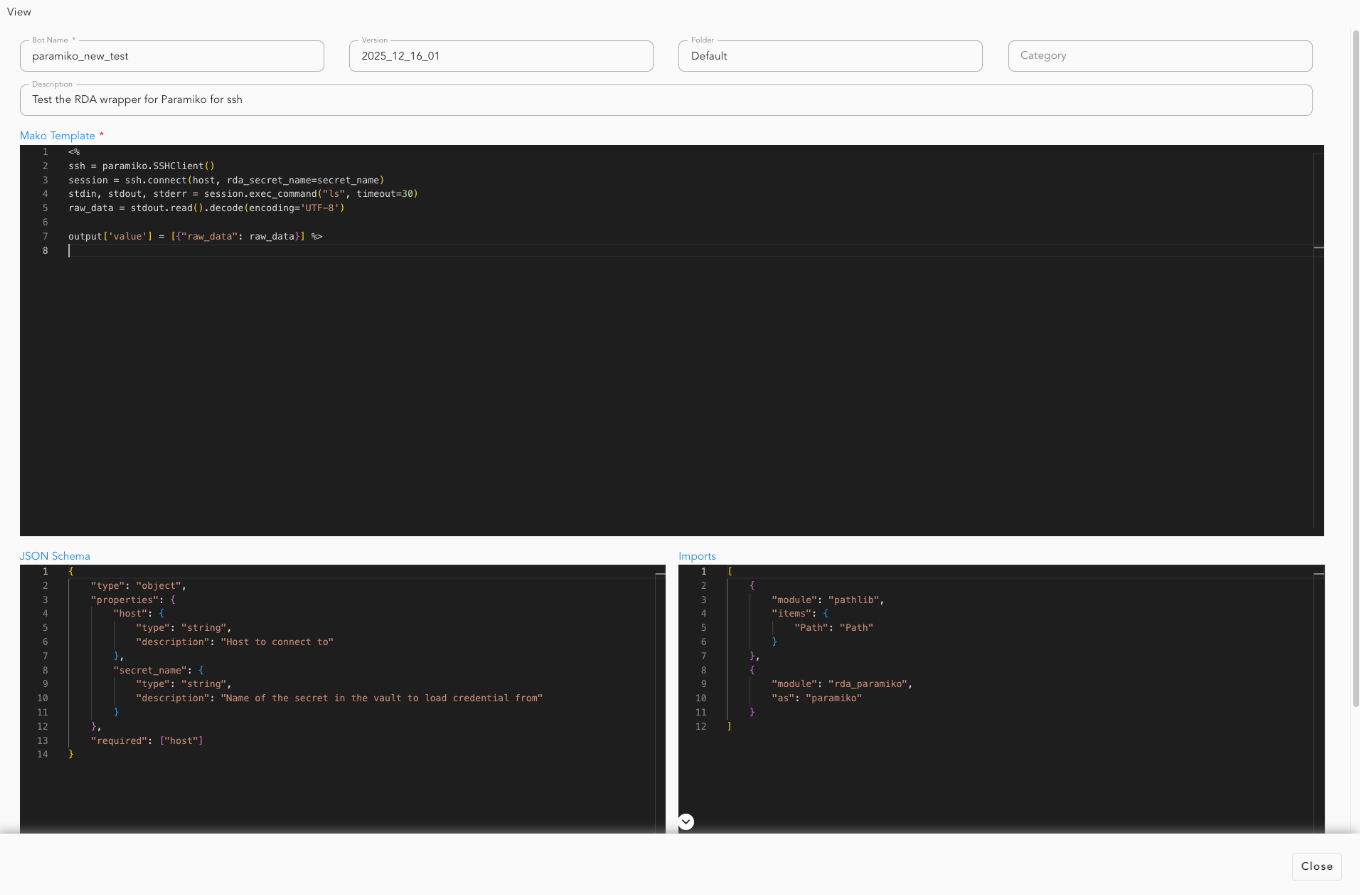
12.2 Invocation as Data Source
@dm:dynamic-bot
    bot_name="paramiko_new_test"
    secret_name is "api-cred-131-35"
    host is "192.168.131.35"
12.3 Expected Output
A DataFrame with columns:
raw_data: Raw response for command executionexecution_status: "Success" or "Failed" (added by framework)execution_timestamp: ISO timestamp (added by framework)
For a complete example demonstrating the incident_wait_rca_publisher bot end to end, please click here.
13. Output Status Fields
The framework automatically adds these fields to all output DataFrames:
| Field | Type | Description |
|---|---|---|
execution_status |
string | "Success" if template executed successfully, "Failed" otherwise |
reason |
string | Error message if execution failed, empty string otherwise |
execution_timestamp |
string | ISO format timestamp (UTC) of execution |
14. Error Handling
14.1 Template Execution Errors
If your template raises an exception, the framework returns:
{
    "bot_name": "my_bot",
    "execution_status": "Failed",
    "reason": "Error message details",
    "execution_timestamp": "2025-11-17T10:30:00.000000"
}
14.2 Parameter Validation Errors
If parameters don't match the JSON schema:
14.3 Best Practices for Error Handling in Templates
<%
try:
    # Your processing logic
    result = perform_operation()

    # Return success
    output["value"] = result
except Exception as e:
    logger.exception(f"Error in bot execution: {e}")

    # Return error status (optional - framework will handle it)
    output["value"] = [{
        "status": "Failed",
        "reason": str(e)
    }]
%>
15. Version Management
15.1 Setting Default Version
15.2 Using Specific Version
15.3 Using Latest Version (Default)
This uses the version where default_version is true.
16. Advanced Topics
16.1 Custom PStream for Bot Registry
By default, bots are stored in cfx_bots_registry. To use a different pstream:
16.2 Combining with Other Data Sources
@dm:recall name is "customer_data"
    --> @dm:dynamic-bot bot_name="enrich_customers" api_key="xyz"
    --> @dm:save name is "enriched_customers"
16.3 Chaining Multiple Bots
@dm:dynamic-bot bot_name="extract_data" source="api"
    --> @dm:dynamic-bot bot_name="transform_data" operation="clean"
    --> @dm:dynamic-bot bot_name="validate_data" schema="strict"
17. Troubleshooting
17.1 Issue: "No bot found with name 'X'"
Solution: Ensure the bot exists in the pstream and default_version is set to true, or specify the version explicitly.
17.2 Issue: "This bot does not accept any parameters"
Solution: The bot has json_schema set to null or empty. Either update the bot configuration or remove the parameters.
17.3 Issue: "No secret with the name 'X' found in the vault"
Solution: Ensure you pass the correct secret name parameter and the secret exists in the vault: secret_name is "my-secret"
17.4 Issue: Template returns text instead of DataFrame
Solution: Use output["value"] = result instead of ${ result }
18. Summary
The Mako Code Executor provides a powerful, flexible way to create dynamic data processing bots:
- Define your bot with a Mako template and JSON schema in the Dynamic Bots dashboard under RDA Administration -> Pipelines
- Invoke the bot with
@dm:dynamic-bot - Access parameters, credentials, and input DataFrames in your template
- Return results using
output["value"] = your_data - Chain with other data sources for complex workflows