Installing OIA (Operations Intelligence & Analytics)
This document provides instructions about fresh Installation & Upgrades for OIA application (Operations Intelligence & Analytics, a.k.a AIOps). It is an application that is installed on top of RDA Fabric platform.
1. Setup & Install
1.1 Online Install
Infra Services tag: 1.0.4
RDAF Platform: 8.2.1
AIOps (OIA) Application: 8.2.1
RDAF Deployment rdafk8s CLI: 1.5.1
RDAF Client rdac CLI: 8.2.1
Infra Services tag: 1.0.4
RDAF Platform: 8.2.1
OIA (AIOps) Application: 8.2.1
RDAF Deployment rdaf CLI: 1.5.1
RDAF Client rdac CLI: 8.2.1
1.1. Prerequisites
For VM deployment options, and post-OS/OVF configuration please follow this Document before beginning the RDAF Fresh Installation.
RDAF Deployment CLI Install:
Please follow the below given steps.
Note
Upgrade RDAF Deployment CLI on both on-premise docker registry VM and RDAF Platform's management VM if provisioned separately.
Login into the VM where rdaf deployment CLI was installed for docker on-premise registry and managing Kubernetes or Non-kubernetes deployment.
- Download the RDAF Deployment CLI's newer version 1.5.1 bundle.
wget https://macaw-amer.s3.us-east-1.amazonaws.com/releases/rdaf-platform/1.5.1/rdafcli-1.5.1.tar.gz
- Install the
rdafk8sCLI to version 1.5.1
- Verify the installed
rdafk8sCLI version is 1.5.1
- Download the RDAF Deployment CLI's newer version 1.5.1 bundle and copy it to RDAF CLI management VM on which
rdafdeployment CLI was installed.
- Download the RDAF Deployment CLI's newer version 1.5.1 bundle
wget https://macaw-amer.s3.us-east-1.amazonaws.com/releases/rdaf-platform/1.5.1/rdafcli-1.5.1.tar.gz
- Install the
rdafCLI to version 1.5.1
- Verify the installed
rdafCLI version is upgraded to 1.5.1
- Download the RDAF Deployment CLI's newer version 1.5.1 bundle and copy it to RDAF management VM on which
rdaf & rdafk8sdeployment CLI was installed.
Run the below command to view the RDAF deployment CLI help
Documented commands (type help <topic>):
========================================
app            geodr             logs                 registry         setup
backup         help              opensearch_external  reset            status
bulk_stats     infra             platform             restore          telegraf
event_gateway  install_rda_edge  prune_images         self_monitoring  validate
file_object    log_monitoring    rdac_cli             setregistry      worker
1.2 On-premise Docker Registry setup:
CloudFabrix support hosting an on-premise docker registry which will download and synchronize RDA Fabric's platform, infrastructure and application services from CloudFabrix's public docker registry that is securely hosted on AWS and from other public docker registries as well. For more information on on-premise docker registry, please refer Docker registry access for RDAF platform services.
Run rdaf registry --help to see available CLI options to deploy and manage on-premise docker registry.
Run rdaf registry setup --help to see available CLI options.
Note
The username/password has not been provided in this documentation. If you need access credentials, please reach out to the Support Team at (support@fabrix.ai)
Run the below command to setup and configure on-premise docker registry service. In the below command example, 192.168.108.131 is the machine on which on-premise registry service is going to installed.
docker2.cloudfabrix.io is the CloudFabrix's public docker registry hosted on AWS from which RDA Fabric docker images are going to be downloaded.
- Run the below command for rdaf registry setup.
1.3. Installation Steps
1.3.1 RDAF Registry Install
Run the below command to install the on-premise docker registry service.
To check the status of the on-premise docker registry service, run the below command.Run the below command to install the on-premise docker registry service.
To check the status of the on-premise docker registry service, run the below command.1.3.2 RDAF Registry Fetch
Once on-premise docker registry service is installed, run the below command to download one or more tags to pre-stage the docker images for RDA Fabric services deployment for fresh install.
Login into the VM where rdaf deployment CLI was installed for docker on-premise registry and managing kubernetes & Non-kubernetes deployment.
Download the new docker image tags for RDAF Platform and OIA (AIOps) Application services and wait until all of the images are downloaded.
To fetch registry please use the below command.
Minio object storage service image need to be downloaded explicitly using the below command.
Note
If the Download of the images fail, Please re-execute the above command
Warning
The image tag requirements in the following sections apply only to Non-K8s deployments. Do not use these image tags for K8s deployments.
Run the below command to verify above mentioned tags are downloaded for all of the RDAF Platform and OIA (AIOps) Application services.
Please make sure 1.0.4 Image tag is downloaded for the following services
- nats - 1.0.4
- minio-tag RELEASE.2024-12-18T13-15-44Z
- mariadb - 1.0.4
- opensearch - 1.0.4
- kafka - 1.0.4
- graphdb - 1.0.4
- haproxy - 1.0.4
- quadrant - 1.0.4.1 (Optional)
- nats - 1.0.4
- minio-tag RELEASE.2024-12-18T13-15-44Z
- mariadb - 1.0.4
- opensearch - 1.0.4
- kafka - 1.0.4
- graphdb - 1.0.4
- haproxy - 1.0.4
- quadrant - 1.0.4 (Optional)
- external opensearch - 1.0.4.1 (Optional)
Please make sure 8.2.1 image tag is downloaded for the below RDAF Platform services.
- rda-client-api-server
- rda-registry
- rda-scheduler
- rda-collector
- rda-identity
- rda-fsm
- rda-asm
- rda-access-manager
- rda-resource-manager
- rda-user-preferences
- onprem-portal
- onprem-portal-nginx
- rda-worker-all
- onprem-portal-dbinit
- cfxdx-nb-nginx-all
- rda-event-gateway
- rda-chat-helper
- rdac
- bulk_stats
Please make sure 8.2.1 image tag is downloaded for the below RDAF OIA (AIOps) Application services.
- cfx rda-app-controller
- cfx rda-alert-processor
- cfx rda-file-browser
- cfx rda-smtp-server
- cfx rda-ingestion-tracker
- cfx rda-reports-registry
- cfx rda-ml-config
- cfx rda-event-consumer
- cfx rda-webhook-server
- cfx rda-irm-service
- cfx rda-alert-ingester
- cfx rda-collaboration
- cfx rda-notification-service
- cfx rda-configuration-service
- cfx rda-alert-processor-companion
Configure Local Registry
- Run the following command to configure the local registry connection, replacing the placeholders with your actual registry IP and certificate path.
rdaf setregistry --host <Host ip of onprem registry VM IP> --port 5000 --cert-path <path of the ca-cert>
rdaf setregistry --host 192.168.108.131 --port 5000 --cert-path /opt/rdaf-registry/registry-ca-cert.crt
Downloaded Docker images are stored under the below path.
/opt/rdaf-registry/data/docker/registry/v2/ or /opt/rdaf/data/docker/registry/v2/
Run the below command to check the filesystem's disk usage on offline registry VM where docker images are pulled.
If necessary, older image tags that are no longer in use can be deleted to free up disk space using the command below.
Note
Run the command below if /opt occupies more than 80% of the disk space or if the free capacity of /opt is less than 25GB.
- Use the following command to setup fresh installation.
Important
After running rdaf setup, update the daemon.json file on all OpenSearch / External OpenSearch VMs before installing OpenSearch or External OpenSearch.
1. Open the daemon.json file:
2. Change the following configuration:
To
{
"tls": true,
"tlscacert": "/etc/tlscerts/ca/ca.pem",
"fixed-cidr-v6": "fdc6:ef49:83db::/64",
"ip6tables": true,
"exec-opts": [
"native.cgroupdriver=cgroupfs"
],
"tlsverify": true,
"default-cgroupns-mode": "private",
"storage-driver": "overlay2",
"hosts": [
"unix:///var/run/docker.sock",
"tcp://0.0.0.0:2376"
],
"tlskey": "/etc/tlscerts/server/server.key",
"ipv6": true,
"debug": false,
"tlscert": "/etc/tlscerts/server/server.pem",
"userland-proxy": false,
"experimental": true,
"live-restore": true
}
3. Reload the systemd daemon and restart Docker:
1.2.2 Install RDAF Infra Services
- Install infra service using below command.
- Run the command below to check the status of the pods in the rda-fabric namespace, filtering by the rdaf-infra app category. Ensure that the pods are in a running state.
- Please use the below mentioned command to see infra services are up and in Running state
- Install infra service using below command.
- Please use the below mentioned command to see infra services are up and in Running state
- Execute the command below to install the
qdrantservice.
Note
This step is optional. Customers who wish to install qdrant service needs to mount a 10GB disk and can run the below command for HA. It will prompt for the deployment IPs, so please make sure to assign 3 IPs for the infrastructure VMs. For Non-HA Please assign one Infra VM IP.
rdauser@xxxxx-infra13360:~$ rdaf infra install --tag 1.0.4 --service qdrant
2025-12-21 12:07:32,548 [rdaf.cmd.infra] INFO     - Installing qdrant
What is the "host/path-on-host" where you want Qdrant to be provisioned?
Qdrant server host/path[10.95.133.63]: 10.95.133.60
2025-12-21 12:07:58,387 [rdaf.component.qdrant] INFO     - Copied Qdrant configuration to /opt/rdaf/config/qdrant/custom_config.yaml on 10.95.133.60
2025-12-21 12:07:58,852 [rdaf.component.qdrant] INFO     - Copied Qdrant
- Please use the below given command to get the status
+--------+---------------+-------------+--------------+------------+
| Name   | Host          | Status      | Container ID | Tag        |
|--------|---------------|-------------|--------------|------------|
| qdrant | 10.95.108.122 | Up 45 hours | b789bba702ad | 1.0.4      |
| qdrant | 10.95.108.123 | Up 45 hours | 84d6b725f64d | 1.0.4      |
| qdrant | 10.95.108.124 | Up 45 hours | d8f37a7b47f0 | 1.0.4      |
+--------+---------------+-------------+--------------+------------+
- Run the below command for the healthcheck
+------------+-----------------+--------+--------+----------------+--------------+
| Name       | Check           | Status | Reason | Host           | Container Id |
+------------+-----------------+--------+--------+----------------+--------------+
| nats       | Port Connection | OK     | N/A    | 192.168.133.60 | db501218bfe7 |
| nats       | Service Status  | OK     | N/A    | 192.168.133.60 | db501218bfe7 |
| nats       | Firewall Port   | OK     | N/A    | 192.168.133.60 | db501218bfe7 |
| nats       | Port Connection | OK     | N/A    | 192.168.133.61 | 5b025c83eb8b |
| nats       | Service Status  | OK     | N/A    | 192.168.133.61 | 5b025c83eb8b |
| nats       | Firewall Port   | OK     | N/A    | 192.168.133.61 | 5b025c83eb8b |
| minio      | Port Connection | OK     | N/A    | 192.168.133.60 | 7192edd5f4bc |
| minio      | Service Status  | OK     | N/A    | 192.168.133.60 | 7192edd5f4bc |
| minio      | Firewall Port   | OK     | N/A    | 192.168.133.60 | 7192edd5f4bc |
| minio      | Port Connection | OK     | N/A    | 192.168.133.61 | a2809a9eae96 |
| minio      | Service Status  | OK     | N/A    | 192.168.133.61 | a2809a9eae96 |
| minio      | Firewall Port   | OK     | N/A    | 192.168.133.61 | a2809a9eae96 |
| minio      | Port Connection | OK     | N/A    | 192.168.133.62 | b7a38a6668cc |
| minio      | Service Status  | OK     | N/A    | 192.168.133.62 | b7a38a6668cc |
| minio      | Firewall Port   | OK     | N/A    | 192.168.133.62 | b7a38a6668cc |
| minio      | Port Connection | OK     | N/A    | 192.168.133.63 | 6163d92f370e |
| minio      | Service Status  | OK     | N/A    | 192.168.133.63 | 6163d92f370e |
| minio      | Firewall Port   | OK     | N/A    | 192.168.133.63 | 6163d92f370e |
+------------+-----------------+--------+--------+----------------+--------------+
Note
Starting from version 1.0.4 onwards, MetalLB Installation is mandatory.
-
For Online Installation Please Click Here
-
For Offiine Installation Please Click Here
1.2.3 Install RDAF Platform Services
- Run the below command to initiate Installing RDAF Platform services.
- Please wait till all of the new platform PODs are in Running state and run the below command to verify their status and make sure all of them are running with
8.2.1version.
+--------------------+----------------+-------------------+--------------+-------+
| Name               | Host           | Status            | Container Id | Tag   |
+--------------------+----------------+-------------------+--------------+-------+
| rda-api-server     | 192.168.131.44 | Up 44 Minutes ago | a1b2c3d4e5f6 | 8.2.1 |
| rda-api-server     | 192.168.131.45 | Up 46 Minutes ago | b2c3d4e5f6a7 | 8.2.1 |
| rda-registry       | 192.168.131.45 | Up 46 Minutes ago | c3d4e5f6a7b8 | 8.2.1 |
| rda-registry       | 192.168.131.44 | Up 46 Minutes ago | d4e5f6a7b8c9 | 8.2.1 |
| rda-identity       | 192.168.131.44 | Up 46 Minutes ago | e5f6a7b8c9d0 | 8.2.1 |
| rda-identity       | 192.168.131.47 | Up 45 Minutes ago | f6a7b8c9d0e1 | 8.2.1 |
| rda-fsm            | 192.168.131.44 | Up 46 Minutes ago | a7b8c9d0e1f2 | 8.2.1 |
| rda-fsm            | 192.168.131.45 | Up 46 Minutes ago | b8c9d0e1f2a3 | 8.2.1 |
| rda-asm            | 192.168.131.44 | Up 46 Minutes ago | c9d0e1f2a3b4 | 8.2.1 |
| rda-asm            | 192.168.131.45 | Up 46 Minutes ago | d0e1f2a3b4c5 | 8.2.1 |
| rda-asm            | 192.168.131.47 | Up 2 Weeks ago    | e1f2a3b4c5d6 | 8.2.1 |
| rda-asm            | 192.168.131.46 | Up 2 Weeks ago    | f2a3b4c5d6e7 | 8.2.1 |
| rda-chat-helper    | 192.168.131.44 | Up 46 Minutes ago | a3b4c5d6e7f8 | 8.2.1 |
| rda-chat-helper    | 192.168.131.45 | Up 45 Minutes ago | b4c5d6e7f8a9 | 8.2.1 |
| rda-access-manager | 192.168.131.45 | Up 46 Minutes ago | c5d6e7f8a9b0 | 8.2.1 |
| rda-access-manager | 192.168.131.46 | Up 45 Minutes ago | d6e7f8a9b0c1 | 8.2.1 |
| rda-resource-      | 192.168.131.44 | Up 45 Minutes ago | e7f8a9b0c1d2 | 8.2.1 |
| manager            |                |                   |              |       |
| rda-resource-      | 192.168.131.45 | Up 45 Minutes ago | f8a9b0c1d2e3 | 8.2.1 |
| manager            |                |                   |              |       |
+--------------------+----------------+-------------------+--------------+-------+
- Run the below command to check the
rda-schedulerservice is elected as a leader underSitecolumn.
+-------+----------------------------------------+-------------+--------------+----------+-------------+-----------------+--------+--------------+---------------+--------------+
| Cat   | Pod-Type                               | Pod-Ready   | Host         | ID       | Site        | Age             |   CPUs |   Memory(GB) | Active Jobs   | Total Jobs   |
|-------+----------------------------------------+-------------+--------------+----------+-------------+-----------------+--------+--------------+---------------+--------------|
| Infra | api-server                             | True        | rda-api-server | 9c0484af |             | 11:41:50 |      8 |        31.33 |               |              |
| Infra | api-server                             | True        | rda-api-server | 196558ed |             | 11:40:23 |      8 |        31.33 |               |              |
| Infra | asm                                    | True        | rda-asm-5b8fb9 | bcbdaae5 |             | 11:42:26 |      8 |        31.33 |               |              |
| Infra | asm                                    | True        | rda-asm-5b8fb9 | 232a58af |             | 11:42:40 |      8 |        31.33 |               |              |
| Infra | collector                              | True        | rda-collector- | d06fb56c |             | 11:42:03 |      8 |        31.33 |               |              |
| Infra | collector                              | True        | rda-collector- | a4c79e4c |             | 11:41:59 |      8 |        31.33 |               |              |
| Infra | registry                               | True        | rda-registry-6 | 2fd69950 |             | 11:42:03 |      8 |        31.33 |               |              |
| Infra | registry                               | True        | rda-registry-6 | fac544d6 |             | 11:41:59 |      8 |        31.33 |               |              |
| Infra | scheduler                              | True        | rda-scheduler- | b98afe88 | *leader*    | 11:42:01 |      8 |        31.33 |               |              |
| Infra | scheduler                              | True        | rda-scheduler- | e25a0841 |             | 11:41:56 |      8 |        31.33 |               |              |
| Infra | worker                                 | True        | rda-worker-5b5 | 99bd054e | rda-site-01 | 11:33:40 |      8 |        31.33 | 0             | 0            |
| Infra | worker                                 | True        | rda-worker-5b5 | 0bfdcd98 | rda-site-01 | 11:33:34 |      8 |        31.33 | 0             | 0            |
+-------+----------------------------------------+-------------+----------------+----------+-------------+----------+--------+--------------+---------------+--------------+
- Run the below command to check if all services has ok status and does not throw any failure messages.
- Run the below command to initiate Installing RDAF Platform services.
- Please wait till all of the new platform services are in Up state and run the below command to verify their status and make sure all of them are running with 8.2 version.
+--------------------------+----------------+-------------------------------+--------------+-------+
| Name                     | Host           | Status                        | Container Id | Tag   |
+--------------------------+----------------+-------------------------------+--------------+-------+
| rda_api_server           | 192.168.108.51 | Up 4 hours                    | a1b2c3d4e5f6 | 8.2.1 |
| rda_api_server           | 192.168.108.52 | Up 4 hours                    | b2c3d4e5f6a7 | 8.2.1 |
| rda_registry             | 192.168.108.51 | Up 4 hours                    | c3d4e5f6a7b8 | 8.2.1 |
| rda_registry             | 192.168.108.52 | Up 4 hours                    | d4e5f6a7b8c9 | 8.2.1 |
| rda_scheduler            | 192.168.108.51 | Up 4 hours                    | e5f6a7b8c9d0 | 8.2.1 |
| rda_scheduler            | 192.168.108.52 | Up 4 hours                    | f6a7b8c9d0e1 | 8.2.1 |
| rda_collector            | 192.168.108.51 | Up 4 hours                    | a7b8c9d0e1f2 | 8.2.1 |
| rda_collector            | 192.168.108.52 | Up 4 hours                    | b8c9d0e1f2a3 | 8.2.1 |
| rda_identity             | 192.168.108.51 | Up 4 hours                    | c9d0e1f2a3b4 | 8.2.1 |
| rda_identity             | 192.168.108.52 | Up 4 hours                    | d0e1f2a3b4c5 | 8.2.1 |
| rda_asm                  | 192.168.108.51 | Up 4 hours                    | e1f2a3b4c5d6 | 8.2.1 |
| rda_asm                  | 192.168.108.52 | Up 4 hours                    | f2a3b4c5d6e7 | 8.2.1 |
| rda_fsm                  | 192.168.108.51 | Up 4 hours                    | a3b4c5d6e7f8 | 8.2.1 |
| rda_fsm                  | 192.168.108.52 | Up 4 hours                    | b4c5d6e7f8a9 | 8.2.1 |
+--------------------------+----------------+-------------------------------+--------------+-------+
Run the below command to check the rda-scheduler service is elected as a leader under Site column.
Run the below command to check if all services has ok status and does not throw any failure messages.
+-----------+----------------------------------------+--------------+----------+-------------+-----------------------------------------------------+----------+-------------------------------------------------------------+
| Cat       | Pod-Type                               | Host         | ID       | Site        | Health Parameter                                    | Status   | Message                                                     |
|-----------+----------------------------------------+--------------+----------+-------------+-----------------------------------------------------+----------+-------------------------------------------------------------|
| rda_app   | alert-ingester                         | 7f75047e9e44 | daa8c414 |             | service-status                                      | ok       |                                                             |
| rda_app   | alert-ingester                         | 7f75047e9e44 | daa8c414 |             | 192.168-connectivity                                  | ok       |                                                             |
| rda_app   | alert-ingester                         | 7f75047e9e44 | daa8c414 |             | service-dependency:configuration-service            | ok       | 2 pod(s) found for configuration-service                    |
| rda_app   | alert-ingester                         | 7f75047e9e44 | daa8c414 |             | service-initialization-status                       | ok       |                                                             |
| rda_app   | alert-ingester                         | 7f75047e9e44 | daa8c414 |             | kafka-connectivity                                  | ok       | Cluster=NTc1NWU1MTQxYmY3MTFlZg, Broker=1, Brokers=[1, 2, 3] |
| rda_app   | alert-ingester                         | f9ec55862be0 | f9b9231c |             | service-status                                      | ok       |                                                             |
| rda_app   | alert-ingester                         | f9ec55862be0 | f9b9231c |             | 192.168-connectivity                                  | ok       |                                                             |
| rda_app   | alert-ingester                         | f9ec55862be0 | f9b9231c |             | service-dependency:configuration-service            | ok       | 2 pod(s) found for configuration-service                    |
| rda_app   | alert-ingester                         | f9ec55862be0 | f9b9231c |             | service-initialization-status                       | ok       |                                                             |
| rda_app   | alert-ingester                         | f9ec55862be0 | f9b9231c |             | kafka-connectivity                                  | ok       | Cluster=NTc1NWU1MTQxYmY3MTFlZg, Broker=3, Brokers=[1, 2, 3] |
| rda_app   | alert-processor                        | c6cc7b04ab33 | b4ebfb06 |             | service-status                                      | ok       |                                                             |
| rda_app   | alert-processor                        | c6cc7b04ab33 | b4ebfb06 |             | 192.168-connectivity                                  | ok       |                                                             |
+-----------+----------------------------------------+--------------+----------+-------------+-----------------------------------------------------+----------+-------------------------------------------------------------+
1.2.4 Install rdac CLI
1.2.5 Install RDA Worker Services
Note
If the worker was deployed in a HTTP proxy environment, please make sure the required HTTP proxy environment variables are added in /opt/rdaf/deployment-scripts/values.yaml file under rda_worker configuration section as shown below before upgrading RDA Worker services.
rda_worker:
  terminationGracePeriodSeconds: 300
  replicas: 6
  sizeLimit: 1024Mi
  privileged: true
  resources:
    requests:
      memory: 100Mi
    limits:
      memory: 24Gi
  env:
    WORKER_GROUP: rda-prod-01
    CAPACITY_FILTER: cpu_load1 <= 7.0 and mem_percent < 95
    MAX_PROCESSES: '1000'
    RDA_ENABLE_TRACES: 'no'
    WORKER_PUBLIC_ACCESS: 'true'
    DISABLE_REMOTE_LOGGING_CONTROL: 'no'
    RDA_SELF_HEALTH_RESTART_AFTER_FAILURES: 3
  extraEnvs:
  - name: http_proxy
    value: http://test:1234@192.168.122.107:3128
  - name: https_proxy
    value: http://test:1234@192.168.122.107:3128
  - name: HTTP_PROXY
    value: http://test:1234@192.168.122.107:3128
  - name: HTTPS_PROXY
    value: http://test:1234@192.168.122.107:3128
  ....
  ....
- Please run the below command to initiate Installing the RDA Worker service PODs.
- Please wait for 120 seconds to let the newer version of RDA Worker service PODs join the RDA Fabric appropriately. Run the below commands to verify the status of the newer RDA Worker service PODs.
+------------+----------------+---------------+--------------+-------+
| Name       | Host           | Status        | Container Id | Tag   |
+------------+----------------+---------------+--------------+-------+
| rda-worker | 192.168.108.17 | Up 1 Hour ago | a1b2c3d4e5f0 | 8.2.1 |
| rda-worker | 192.168.108.18 | Up 1 Hour ago | f9e8d7c6b5a4 | 8.2.1 |
+------------+----------------+---------------+--------------+-------+
- Run the below command to check if all RDA Worker services has ok status and does not throw any failure messages.
Note
If the worker was deployed in a HTTP proxy environment, please make sure the required HTTP proxy environment variables are added in /opt/rdaf/deployment-scripts/values.yaml file under rda_worker configuration section as shown below before upgrading RDA Worker services.
rda_worker:
  mem_limit: 8G
  memswap_limit: 8G
  privileged: false
  environment:
    RDA_ENABLE_TRACES: 'no'
    RDA_SELF_HEALTH_RESTART_AFTER_FAILURES: 3
    http_proxy:  "http://test:1234@192.168.122.107:3128"
    https_proxy: "http://test:1234@192.168.122.107:3128"
    HTTP_PROXY:  "http://test:1234@192.168.122.107:3128"
    HTTPS_PROXY: "http://test:1234@192.168.122.107:3128"
Please run the below command to initiate Installing the RDA Worker Service
Please wait for 120 seconds to let the newer version of RDA Worker service containers join the RDA Fabric appropriately. Run the below commands to verify the status of the newer RDA Worker service containers.
| Infra | worker      | True        | 6eff605e72c4 | a318f394 | rda-site-01 | 13:45:13 |      4 |        31.21 | 0             | 0            |
| Infra | worker      | True        | ae7244d0d10a | 554c2cd8 | rda-site-01 | 13:40:40 |      4 |        31.21 | 0             | 0            |
+------------+----------------+------------+--------------+---------+
| Name       | Host           | Status     | Container Id | Tag     |
+------------+----------------+------------+--------------+---------+
| rda_worker | 192.168.108.53 | Up 4 hours | 97486bd27309 | 8.2.1   |
| rda_worker | 192.168.108.54 | Up 4 hours | 88d9d76ca5e1 | 8.2.1   |
+------------+----------------+------------+--------------+---------+
+-----------+----------------------------------------+--------------+----------+-------------+-----------------------------------------------------+----------+-----------------------------------------------------------------------------------------------------------------------------+
| Cat       | Pod-Type                               | Host         | ID       | Site        | Health Parameter                                    | Status   | Message                                                                                                                     |
|-----------+----------------------------------------+--------------+----------+-------------+-----------------------------------------------------+----------+-----------------------------------------------------------------------------------------------------------------------------|
| rda_infra | api-server                             | 1b0542719618 | 1845ae67 |             | service-status                                      | ok       |                                                                                                                             |
| rda_infra | api-server                             | 1b0542719618 | 1845ae67 |             | 192.168-connectivity                                  | ok       |                                                                                                                             |
| rda_infra | api-server                             | d4404cffdc7a | a4cfdc6d |             | service-status                                      | ok       |                                                                                                                             |
| rda_infra | api-server                             | d4404cffdc7a | a4cfdc6d |             | 192.168-connectivity                                  | ok       |                                                                                                                             |
| rda_infra | asm                                    | 8d3d52a7a475 | 418c9dc1 |             | service-status                                      | ok       |                                                                                                                             |
| rda_infra | asm                                    | 8d3d52a7a475 | 418c9dc1 |             | 192.168-connectivity                                  | ok       |                                                                                                                             |
| rda_infra | asm                                    | ab172a9b8229 | 2ac1d67a |             | service-status                                      | ok       |                                                                                                                             |
| rda_infra | asm                                    | ab172a9b8229 | 2ac1d67a |             | 192.168-connectivity                                  | ok       |                                                                                                                             |
| rda_app   | asset-dependency                       | 6ac69ca1085c | c2e9dcb9 |             | service-status                                      | ok       |                                                                                                                             |
| rda_app   | asset-dependency                       | 6ac69ca1085c | c2e9dcb9 |             | 192.168-connectivity                                  | ok       |                                                                                                                             |
| rda_app   | asset-dependency                       | 58a5f4f460d3 | 0b91caac |             | service-status                                      | ok       |                                                                                                                             |
| rda_app   | asset-dependency                       | 58a5f4f460d3 | 0b91caac |             | 192.168-connectivity                                  | ok       |                                                                                                                             |
| rda_app   | authenticator                          | 9011c2aef498 | 9f7efdc3 |             | service-status                                      | ok       |                                                                                                                             |
| rda_app   | authenticator                          | 9011c2aef498 | 9f7efdc3 |             | 192.168-connectivity                                  | ok       |                                                                                                                             |
| rda_app   | authenticator                          | 9011c2aef498 | 9f7efdc3 |             | DB-connectivity                                     | ok       |                                                                                                                             |
| rda_app   | authenticator                          | 148621ed8c82 | dbf16b82 |             | service-status                                      | ok       |                                                                                                                             |
| rda_app   | authenticator                          | 148621ed8c82 | dbf16b82 |             | 192.168-connectivity                                  | ok       |                                                                                                                             |
| rda_app   | authenticator                          | 148621ed8c82 | dbf16b82 |             | DB-connectivity                                     | ok       |                                                                                                                             |
| rda_app   | cfx-app-controller                     | 75ec0f30cfa3 | 1198fdee |             | service-status                                      | ok       |                                                                                                                             |
| rda_app   | cfx-app-controller                     | 75ec0f30cfa3 | 1198fdee |             | 192.168-connectivity                                  | ok       |                                                                                                                             |
| rda_app   | cfx-app-controller                     | 75ec0f30cfa3 | 1198fdee |             | service-initialization-status                       | ok       |                                                                                                                             |
| rda_app   | cfx-app-controller                     | 75ec0f30cfa3 | 1198fdee |             | DB-connectivity                                     | ok       |
+-----------+----------------------------------------+--------------+----------+-------------+-----------------------------------------------------+----------+-----------------------------------------------------------------------------------------------------------------------------+
Important
For detailed instructions, refer to Configure OIA Services for Specific Deployment Requirements, which outlines how to tailor OIA service configurations based on users deployment's unique needs.
1.2.6 Install OIA Application Services
- Run the following command to update the OIA configuration in
haproxy.cfg.
- Run the below commands to initiate Installing RDAF OIA Application services
- Please wait till all of the new OIA application service PODs are in Running state and run the below command to verify their status and make sure they are running with 8.2.1 version.
+------------------------+----------------+-------------------+--------------+-------+
| Name                   | Host           | Status            | Container Id | Tag   |
+------------------------+----------------+-------------------+--------------+-------+
| rda-alert-ingester     | 192.168.131.47 | Up 54 Minutes ago | a1b2c3d4e5f6 | 8.2.1 |
| rda-alert-ingester     | 192.168.131.49 | Up 49 Minutes ago | b2c3d4e5f6a7 | 8.2.1 |
| rda-alert-processor    | 192.168.131.49 | Up 44 Minutes ago | c3d4e5f6a7b8 | 8.2.1 |
| rda-alert-processor    | 192.168.131.50 | Up 54 Minutes ago | d4e5f6a7b8c9 | 8.2.1 |
| rda-alert-processor-   | 192.168.131.47 | Up 54 Minutes ago | e5f6a7b8c9d0 | 8.2.1 |
| companion              |                |                   |              |       |
| rda-alert-processor-   | 192.168.131.49 | Up 48 Minutes ago | f6a7b8c9d0e1 | 8.2.1 |
| companion              |                |                   |              |       |
| rda-app-controller     | 192.168.131.47 | Up 54 Minutes ago | a7b8c9d0e1f2 | 8.2.1 |
| rda-app-controller     | 192.168.131.46 | Up 54 Minutes ago | b8c9d0e1f2a3 | 8.2.1 |
| rda-collaboration      | 192.168.131.49 | Up 43 Minutes ago | c9d0e1f2a3b4 | 8.2.1 |
| rda-collaboration      | 192.168.131.50 | Up 53 Minutes ago | d0e1f2a3b4c5 | 8.2.1 |
| rda-configuration-     | 192.168.131.46 | Up 54 Minutes ago | e1f2a3b4c5d6 | 8.2.1 |
| service                |                |                   |              |       |
| rda-configuration-     | 192.168.131.49 | Up 51 Minutes ago | f2a3b4c5d6e7 | 8.2.1 |
| service                |                |                   |              |       |
+------------------------+----------------+-------------------+--------------+-------+
- Run the below command to verify all OIA application services are up and running.
+-------+----------------------------------------+-------------+----------------+----------+-------------+----------+--------+--------------+---------------+--------------+
| Cat   | Pod-Type                               | Pod-Ready   | Host           | ID       | Site        | Age      |   CPUs |   Memory(GB) | Active Jobs   | Total Jobs   |
|-------+----------------------------------------+-------------+----------------+----------+-------------+----------+--------+--------------+---------------+--------------|
| App   | alert-ingester                         | True        | rda-alert-inge | 6a6e464d |             | 19:19:06 |      8 |        31.33 |               |              |
| App   | alert-ingester                         | True        | rda-alert-inge | 7f6b42a0 |             | 19:19:23 |      8 |        31.33 |               |              |
| App   | alert-processor                        | True        | rda-alert-proc | a880e491 |             | 19:19:51 |      8 |        31.33 |               |              |
| App   | alert-processor                        | True        | rda-alert-proc | b684609e |             | 19:19:48 |      8 |        31.33 |               |              |
| App   | alert-processor-companion              | True        | rda-alert-proc | 874f3b33 |             | 19:18:54 |      8 |        31.33 |               |              |
| App   | alert-processor-companion              | True        | rda-alert-proc | 70cadaa7 |             | 19:18:35 |      8 |        31.33 |               |              |
| App   | asset-dependency                       | True        | rda-asset-depe | bde06c15 |             | 19:44:20 |      8 |        31.33 |               |              |
| App   | asset-dependency                       | True        | rda-asset-depe | 47b9eb02 |             | 19:44:08 |      8 |        31.33 |               |              |
| App   | authenticator                          | True        | rda-identity-d | faa33e1b |             | 19:44:22 |      8 |        31.33 |               |              |
| App   | authenticator                          | True        | rda-identity-d | 36083c36 |             | 19:44:16 |      8 |        31.33 |               |              |
| App   | cfx-app-controller                     | True        | rda-app-contro | 5fd3c3f4 |             | 19:19:39 |      8 |        31.33 |               |              |
| App   | cfx-app-controller                     | True        | rda-app-contro | d66e5ce8 |             | 19:19:26 |      8 |        31.33 |               |              |
| App   | cfxdimensions-app-access-manager       | True        | rda-access-man | ecbb535c |             | 19:44:16 |      8 |        31.33 |               |              |
| App   | cfxdimensions-app-access-manager       | True        | rda-access-man | 9a05db5a |             | 19:44:06 |      8 |        31.33 |               |              |
| App   | cfxdimensions-app-collaboration        | True        | rda-collaborat | 61b3c53b |             | 19:18:48 |      8 |        31.33 |               |              |
| App   | cfxdimensions-app-collaboration        | True        | rda-collaborat | 09b9474e |             | 19:18:27 |      8 |        31.33 |               |              |
+-------+----------------------------------------+-------------+----------------+----------+-------------+-------------------+--------+-----------------------------+--------------+
- Run the below command to check if all services has ok status and does not throw any failure messages.
+-----------+----------------------------------------+--------------+----------+-------------+-----------------------------------------------------+----------+-----------------------------------------------------------------------------------------------------------------------------+
| Cat       | Pod-Type                               | Host         | ID       | Site        | Health Parameter                                    | Status   | Message                                                                                                                     |
|-----------+----------------------------------------+--------------+----------+-------------+-----------------------------------------------------+----------+-----------------------------------------------------------------------------------------------------------------------------|
| rda_app   | alert-ingester                         | rda-alert-in | 6a6e464d |             | service-status                                      | ok       |                                                                                                                             |
| rda_app   | alert-ingester                         | rda-alert-in | 6a6e464d |             | 192.168-connectivity                                  | ok       |                                                                                                                             |
| rda_app   | alert-ingester                         | rda-alert-in | 6a6e464d |             | service-dependency:configuration-service            | ok       | 2 pod(s) found for configuration-service                                                                                    |
| rda_app   | alert-ingester                         | rda-alert-in | 6a6e464d |             | service-initialization-status                       | ok       |                                                                                                                             |
| rda_app   | alert-ingester                         | rda-alert-in | 6a6e464d |             | kafka-connectivity                                  | ok       | Cluster=dKnnkaYSPELK8DBUk0rPig, Broker=0, Brokers=[0, 1, 2]                                                                 |
| rda_app   | alert-ingester                         | rda-alert-in | 6a6e464d |             | kafka-consumer                                      | ok       | Health: [{'387c0cb507b84878b9d0b15222cb4226.inbound-events': 0, '387c0cb507b84878b9d0b15222cb4226.mapped-events': 0}, {}]   |
| rda_app   | alert-ingester                         | rda-alert-in | 7f6b42a0 |             | service-status                                      | ok       |                                                                                                                             |
| rda_app   | alert-ingester                         | rda-alert-in | 7f6b42a0 |             | 192.168-connectivity                                  | ok       |                                                                                                                             |
| rda_app   | alert-ingester                         | rda-alert-in | 7f6b42a0 |             | service-dependency:configuration-service            | ok       | 2 pod(s) found for configuration-service                                                                                    |
| rda_app   | alert-ingester                         | rda-alert-in | 7f6b42a0 |             | service-initialization-status                       | ok       |                                                                                                                             |
| rda_app   | alert-ingester                         | rda-alert-in | 7f6b42a0 |             | kafka-consumer                                      | ok       | Health: [{'387c0cb507b84878b9d0b15222cb4226.inbound-events': 0, '387c0cb507b84878b9d0b15222cb4226.mapped-events': 0}, {}]   |
| rda_app   | alert-ingester                         | rda-alert-in | 7f6b42a0 |             | kafka-connectivity                                  | ok       | Cluster=dKnnkaYSPELK8DBUk0rPig, Broker=1, Brokers=[0, 1, 2]                                                                 |
| rda_app   | alert-processor                        | rda-alert-pr | a880e491 |             | service-status                                      | ok       |                                                                                                                             |
| rda_app   | alert-processor                        | rda-alert-pr | a880e491 |             | 192.168-connectivity                                  | ok       |                                                                                                                             |
| rda_app   | alert-processor                        | rda-alert-pr | a880e491 |             | service-dependency:cfx-app-controller               | ok       | 2 pod(s) found for cfx-app-controller                                                                                       |
| rda_app   | alert-processor                        | rda-alert-pr | a880e491 |             | service-dependency:configuration-service            | ok       | 2 pod(s) found for configuration-service                                                                                    |
| rda_app   | alert-processor                        | rda-alert-pr | a880e491 |             | service-initialization-status                       | ok       |                                                                                                                             |
| rda_app   | alert-processor                        | rda-alert-pr | a880e491 |             | kafka-connectivity                                  | ok       | Cluster=dKnnkaYSPELK8DBUk0rPig, Broker=1, Brokers=[0, 1, 2]                                                                 |
| rda_app   | alert-processor                        | rda-alert-pr | a880e491 |             | DB-connectivity                                     | ok       |                                                                                                                             |
+-----------+----------------------------------------+--------------+----------+-------------+-----------------------------------------------------+----------+-------------------------------------------------------------+
- Run the following command to update the OIA configuration in
haproxy.cfg.
- Run the below commands to initiate Installing the RDA Fabric OIA Application services.
- Please wait till all of the new OIA application service containers are in Up state and run the below command to verify their status and make sure they are running with 8.2.1 version.
+------------------------------------+----------------+------------+--------------+-------+
| Name                               | Host           | Status     | Container Id | Tag   |
+------------------------------------+----------------+------------+--------------+-------+
| cfx-rda-app-controller             | 192.168.108.51 | Up 3 hours | a1b2c3d4e5f6 | 8.2.1 |
| cfx-rda-app-controller             | 192.168.108.52 | Up 3 hours | b2c3d4e5f6a7 | 8.2.1 |
| cfx-rda-reports-registry           | 192.168.108.51 | Up 4 hours | c3d4e5f6a7b8 | 8.2.1 |
| cfx-rda-reports-registry           | 192.168.108.52 | Up 4 hours | d4e5f6a7b8c9 | 8.2.1 |
| cfx-rda-notification-service       | 192.168.108.51 | Up 4 hours | e5f6a7b8c9d0 | 8.2.1 |
| cfx-rda-notification-service       | 192.168.108.52 | Up 4 hours | f6a7b8c9d0e1 | 8.2.1 |
| cfx-rda-file-browser               | 192.168.108.51 | Up 4 hours | a7b8c9d0e1f2 | 8.2.1 |
| cfx-rda-file-browser               | 192.168.108.52 | Up 4 hours | b8c9d0e1f2a3 | 8.2.1 |
| cfx-rda-configuration-service      | 192.168.108.51 | Up 4 hours | c9d0e1f2a3b4 | 8.2.1 |
| cfx-rda-configuration-service      | 192.168.108.52 | Up 4 hours | d0e1f2a3b4c5 | 8.2.1 |
| cfx-rda-alert-ingester             | 192.168.108.51 | Up 4 hours | e1f2a3b4c5d6 | 8.2.1 |
| cfx-rda-alert-ingester             | 192.168.108.52 | Up 4 hours | f2a3b4c5d6e7 | 8.2.1 |
| cfx-rda-webhook-server             | 192.168.108.51 | Up 4 hours | a3b4c5d6e7f8 | 8.2.1 |
| cfx-rda-webhook-server             | 192.168.108.52 | Up 4 hours | b4c5d6e7f8a9 | 8.2.1 |
| cfx-rda-smtp-server                | 192.168.108.51 | Up 4 hours | c5d6e7f8a9b0 | 8.2.1 |
| cfx-rda-smtp-server                | 192.168.108.52 | Up 4 hours | d6e7f8a9b0c1 | 8.2.1 |
+------------------------------------+----------------+------------+--------------+-------+
Run the below command to verify all OIA application services are up and running.
+-------+----------------------------------------+-------------+----------------+----------+-------------+----------+--------+--------------+---------------+--------------+
| Cat   | Pod-Type                               | Pod-Ready   | Host           | ID       | Site        | Age      |   CPUs |   Memory(GB) | Active Jobs   | Total Jobs   |
|-------+----------------------------------------+-------------+----------------+----------+-------------+----------+--------+--------------+---------------+--------------|
| App   | alert-ingester                         | True        | rda-alert-inge | 6a6e464d |             | 19:22:36 |      8 |        31.33 |               |              |
| App   | alert-ingester                         | True        | rda-alert-inge | 7f6b42a0 |             | 19:22:53 |      8 |        31.33 |               |              |
| App   | alert-processor                        | True        | rda-alert-proc | a880e491 |             | 19:23:21 |      8 |        31.33 |               |              |
| App   | alert-processor                        | True        | rda-alert-proc | b684609e |             | 19:23:18 |      8 |        31.33 |               |              |
| App   | alert-processor-companion              | True        | rda-alert-proc | 874f3b33 |             | 19:22:24 |      8 |        31.33 |               |              |
| App   | alert-processor-companion              | True        | rda-alert-proc | 70cadaa7 |             | 19:22:05 |      8 |        31.33 |               |              |
| App   | asset-dependency                       | True        | rda-asset-depe | bde06c15 |             | 19:47:50 |      8 |        31.33 |               |              |
| App   | asset-dependency                       | True        | rda-asset-depe | 47b9eb02 |             | 19:47:38 |      8 |        31.33 |               |              |
| App   | authenticator                          | True        | rda-identity-d | faa33e1b |             | 19:47:52 |      8 |        31.33 |               |              |
| App   | authenticator                          | True        | rda-identity-d | 36083c36 |             | 19:47:46 |      8 |        31.33 |               |              |
| App   | cfx-app-controller                     | True        | rda-app-contro | 5fd3c3f4 |             | 19:23:09 |      8 |        31.33 |               |              |
| App   | cfx-app-controller                     | True        | rda-app-contro | d66e5ce8 |             | 19:22:56 |      8 |        31.33 |               |              |
| App   | cfxdimensions-app-access-manager       | True        | rda-access-man | ecbb535c |             | 19:47:46 |      8 |        31.33 |               |              |
| App   | cfxdimensions-app-access-manager       | True        | rda-access-man | 9a05db5a |             | 19:47:36 |      8 |        31.33 |               |              |
| App   | cfxdimensions-app-collaboration        | True        | rda-collaborat | 61b3c53b |             | 19:22:18 |      8 |        31.33 |               |              |
| App   | cfxdimensions-app-collaboration        | True        | rda-collaborat | 09b9474e |             | 19:21:57 |      8 |        31.33 |               |              |
| App   | cfxdimensions-app-file-browser         | True        | rda-file-brows | 00495640 |             | 19:22:45 |      8 |        31.33 |               |              |
| App   | cfxdimensions-app-file-browser         | True        | rda-file-brows | 640f0653 |             | 19:22:29 |      8 |        31.33 |               |              |
| App   | cfxdimensions-app-irm_service          | True        | rda-irm-servic | 27e345c5 |             | 19:21:43 |      8 |        31.33 |               |              |
| App   | cfxdimensions-app-irm_service          | True        | rda-irm-servic | 23c7e082 |             | 19:21:56 |      8 |        31.33 |               |              |
| App   | cfxdimensions-app-notification-service | True        | rda-notificati | bbb5b08b |             | 19:23:20 |      8 |        31.33 |               |              |
| App   | cfxdimensions-app-notification-service | True        | rda-notificati | 9841bcb5 |             | 19:23:02 |      8 |        31.33 |               |              |
+-------+----------------------------------------+-------------+----------------+----------+-------------+----------+--------+--------------+---------------+--------------+
Run the below command to check if all services has ok status and does not throw any failure messages.
+-----------+----------------------------------------+--------------+----------+-------------+-----------------------------------------------------+----------+-------------------------------------------------------------+
| Cat       | Pod-Type                               | Host         | ID       | Site        | Health Parameter                                    | Status   | Message                                                     |
|-----------+----------------------------------------+--------------+----------+-------------+-----------------------------------------------------+----------+-------------------------------------------------------------|
| rda_app   | alert-ingester                         | 7f75047e9e44 | daa8c414 |             | service-status                                      | ok       |                                                             |
| rda_app   | alert-ingester                         | 7f75047e9e44 | daa8c414 |             | 192.168-connectivity                                  | ok       |                                                             |
| rda_app   | alert-ingester                         | 7f75047e9e44 | daa8c414 |             | service-dependency:configuration-service            | ok       | 2 pod(s) found for configuration-service                    |
| rda_app   | alert-ingester                         | 7f75047e9e44 | daa8c414 |             | service-initialization-status                       | ok       |                                                             |
| rda_app   | alert-ingester                         | 7f75047e9e44 | daa8c414 |             | kafka-connectivity                                  | ok       | Cluster=NTc1NWU1MTQxYmY3MTFlZg, Broker=1, Brokers=[1, 2, 3] |
| rda_app   | alert-ingester                         | f9ec55862be0 | f9b9231c |             | service-status                                      | ok       |                                                             |
| rda_app   | alert-ingester                         | f9ec55862be0 | f9b9231c |             | 192.168-connectivity                                  | ok       |                                                             |
| rda_app   | alert-ingester                         | f9ec55862be0 | f9b9231c |             | service-dependency:configuration-service            | ok       | 2 pod(s) found for configuration-service                    |
| rda_app   | alert-ingester                         | f9ec55862be0 | f9b9231c |             | service-initialization-status                       | ok       |                                                             |
| rda_app   | alert-ingester                         | f9ec55862be0 | f9b9231c |             | kafka-connectivity                                  | ok       | Cluster=NTc1NWU1MTQxYmY3MTFlZg, Broker=2, Brokers=[1, 2, 3] |
| rda_app   | alert-processor                        | c6cc7b04ab33 | b4ebfb06 |             | service-status                                      | ok       |                                                             |
| rda_app   | alert-processor                        | c6cc7b04ab33 | b4ebfb06 |             | 192.168-connectivity                                  | ok       |                                                             |
+-----------+----------------------------------------+--------------+----------+-------------+-----------------------------------------------------+----------+-------------------------------------------------------------+
1.2.7 Install Event Gateway Services
Note
If a user deployed the event gateway using the RDAF CLI, follow Step 1 and skip Step 2 or if the user did not deploy event gateway in RDAF CLI go to Step 2
Install Event Gateway Using RDAF CLI
- To install the event gateway, log in to the rdaf cli VM and execute the following command.
- Use the command given below to find the Event Gateway status
+-------------------+-----------------+---------------+--------------+-------------+
| Name              | Host            | Status        | Container Id | Tag         |
+-------------------+-----------------+---------------+--------------+-------------+
| rda-event-gateway | 192.168.108.118 | Up 1 Days ago | 75e8baae6bbc | 8.2.1       |
| rda-event-gateway | 192.168.108.117 | Up 1 Days ago | 53ea97a898c0 | 8.2.1       |
+-------------------+-----------------+---------------+--------------+-------------+
Note
If a user deployed the event gateway using the RDAF CLI, follow Step 1 and skip Step 2 or if the user did not deploy event gateway in RDAF CLI go to Step 2
Install Event Gateway Using RDAF CLI
- To install the event gateway, log in to the rdaf cli VM and execute the following command.
- Use the command given below to find the Event Gateway status
+-------------------+-----------------+---------------+--------------+-------------+
| Name              | Host            | Status        | Container Id | Tag         |
+-------------------+-----------------+---------------+--------------+-------------+
| rda-event-gateway | 192.168.108.127 | Up 1 Days ago | 7f7261b086bf | 8.2.1       |
| rda-event-gateway | 192.168.108.128 | Up 1 Days ago | 5bc4d041a02f | 8.2.1       |
+-------------------+-----------------+---------------+--------------+-------------+
1.2.9 Install RDAF Bulkstats Services
Note
This service is applicable for Non-K8s only.
Note
The RDAF Bulkstats service is optional and only necessary if the Bulkstats data ingestion feature is required. Otherwise, you may ignore the steps below and go to next section.
Run the below command to install bulk_stats services
A comma can be used to identify two hosts for HA Setups.
Note
When deploying bulk stats on New VM, make sure the username and password matches with the existing VM's
Run the below command to get the bulk_stats status
+----------------+----------------+-------------+--------------+-------+
| Name           | Host           | Status      | Container Id | Tag   |
+----------------+----------------+-------------+--------------+-------+
| rda_bulk_stats | 192.168.133.96 | Up 4 days   | 67da2301d30c | 8.2.1 |
| rda_bulk_stats | 192.168.133.92 | Up 46 hours | 32179032bb97 | 8.2.1 |
+----------------+----------------+-------------+--------------+-------+
1.2.9.1 Install RDAF File Object Services
Note
This service is applicable for Non-K8s only, The RDAF File Object service is optional and only necessary if the Bulkstats data ingestion feature is required. Otherwise, you may ignore the steps below and go to next section
Run the below command to install File Object services and provision service instances across multiple hosts, ensuring that all VMs use the same username and password.
Log in to each file object node and update the permissions for the /opt/public folder.
Run the below command to get the file_object status
+-----------------+----------------+-----------+--------------+-------+
| Name            | Host           | Status    | Container Id | Tag   |
+-----------------+----------------+-----------+--------------+-------+
| rda_file_object | 192.168.108.50 | Up 7 days | 47d1a68c2bf2 | 8.2.1 |
| rda_file_object | 192.168.108.51 | Up 7 days | 6ce10218c204 | 8.2.1 |
+-----------------+----------------+-----------+--------------+-------+
1.2.10 Install External Opensearch
Note
This service is applicable for Non-K8s only
- To Install External Opensearch please follow this Document
1.2.11 Setup & Install Self Monitoring
This service helps monitor the functional health of RDAF platform services and sends notifications via Slack, Webex Teams, or other collaboration tools.
For detailed information, please refer CFX Self Monitor Service
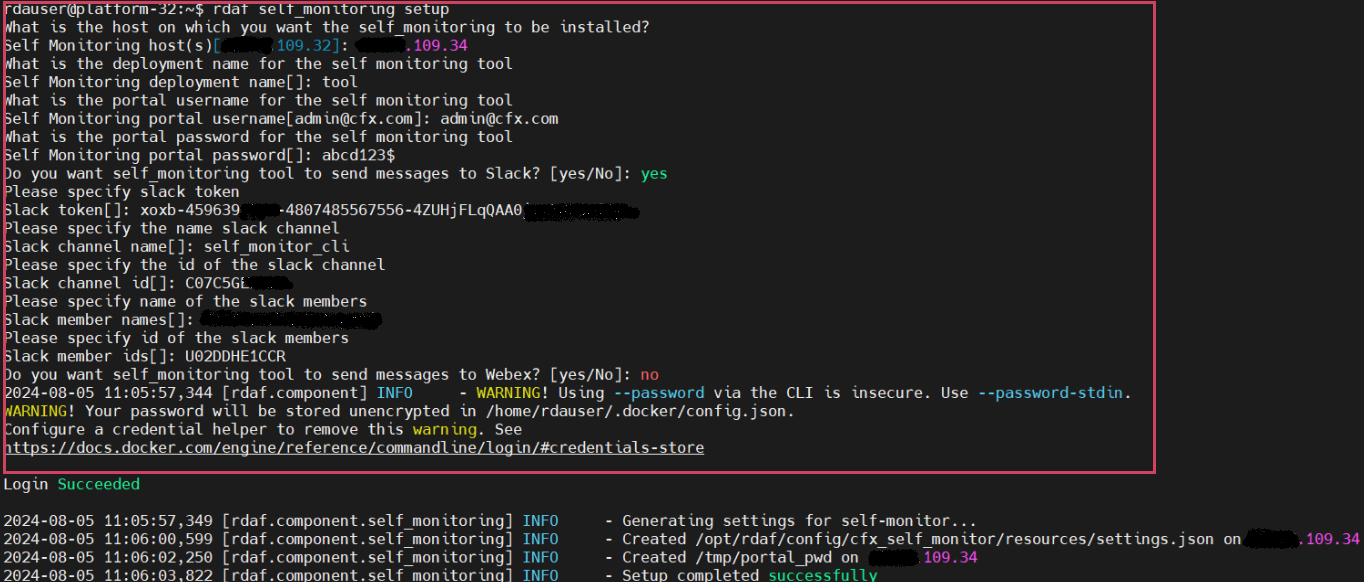
- Please run the below command to setup Self Monitoring
The user must enter the necessary parameters as indicated in the screenshot below Example.
- Run the below command to install Self Monitoring
- Run the below command to verify the status
+------------------+----------------+-------------+--------------+---------+
| Name             | Host           | Status      | Container Id | Tag     |
+------------------+----------------+-------------+--------------+---------+
| cfx_self_monitor | 192.168.108.20 | Up 2  hours | 501de41db006 | 8.2.1   |
+------------------+----------------+-------------+--------------+---------+
- Please run the below command to setup Self Monitoring
The user must enter the necessary parameters as indicated in the screenshot below Example.
- Run the below command to install Self Monitoring
- Run the below command to verify the status
+------------------+----------------+---------------+--------------+---------+
| Name             | Host           | Status        | Container Id | Tag     |
+------------------+----------------+---------------+--------------+---------+
| cfx_self_monitor | 192.168.109.24 | Up 11 seconds | 5c468d35f3d4 | 8.2.1   |
+------------------+----------------+---------------+--------------+---------+
1.2.12 Install Log Monitoring
rdafk8s log_monitoring install command is used to deploy / install RDAF log monitoring services. Run the below command to view the available CLI options.
usage: log_monitoring install [-h] --log-monitoring-host LOG_MONITORING_HOST
                            --tag TAG
log_monitoring install: error: the following arguments are required: --log-monitoring-host, --tag
To deploy all RDAF log monitoring services, execute the following command. Please note that it is mandatory to specify the host for the Logstash service deployment using the --log-monitoring-host option.
Note
Below shown Logstash host ip address is for a reference only. For the latest log monitoring services tag, please contact CloudFabrix support team at support@cloudfabrix.com.
{"status":"CREATED","message":"'rdaf-log-monitoring' created."}
{"status":"CREATED","message":"'role-log-monitoring' created."}
{"status":"OK","message":"'rdaf-log-monitoring' updated."}
{"status":"CREATED","message":"'role-log-monitoring' created."}
2023-10-31 09:04:33,752 [rdaf.component.log_monitoring] INFO     - Creating rdaf_services_logs pstream...
{
"retention_days": 15,
"timestamp": "@timestamp",
"search_case_insensitive": true,
"_settings": {
    "number_of_shards": 3,
    "number_of_replicas": 1,
    "refresh_interval": "60s"
}
}
Persistent stream saved.

2023-10-31 09:04:41,064 [rdaf.component.log_monitoring] INFO     - Successfully installed and configured rdaf log monitoring...
Run the below command to see the status of all of the deployed RDAF log monitoring services.
+---------------------+------------------------+---------------------------+-------------------------+---------+
| Name                | Host                   | Status                    | Container Id            | Tag     |
+---------------------+------------------------+---------------------------+-------------------------+---------+
| rda-filebeat        | 192.168.125.52         | Up 18 Hours ago           | 92e83de200a2            | 1.0.4   |
| rda-logstash        | 192.168.125.52         | Up 18 Hours ago           | 00c1929fdea4            | 1.0.4   |
+---------------------+------------------------+---------------------------+-------------------------+---------+
Below are the Kubernetes Cluster commands to check the status of RDA Fabric log monitoring services.
---------------------------------------------------------------------------------------------------------------------------
rda-logstash-796f9d9f75-vchpq       1/1     Running   0          14m
rda-filebeat-9clrn                  1/1     Running   0          15m
---------------------------------------------------------------------------------------------------------------------------
Run the following commands to obtain additional details of the deployed RDAF log monitoring services (PODs), including information about the node(s) on which they were deployed.
To get the detailed status of each RDAF log monitoring service POD, run the below command.
---------------------------------------------------------------------------------------------------------------------------
Name:         rda-logstash-796f9d9f75-vchpq
Namespace:    rda-fabric
Priority:     0
Node:         k8workernode/192.168.125.52
Start Time:   Tue, 31 Oct 2023 09:04:40 +0000
Labels:       app=rda-fabric-services
            app_category=rdaf-infra
            app_component=rda-logstash
            pod-template-hash=796f9d9f75
Annotations:  cni.projectcalico.org/containerID: 0e4208d848db8c99fb977e5bf3f32876b31a090b29e632385dddb2c7cbed599c
            cni.projectcalico.org/podIP: 192.168.75.76/32
            cni.projectcalico.org/podIPs: 192.168.75.76/32
Status:       Running
IP:           192.168.75.76
IPs:
IP:           192.168.75.76

...
...

QoS Class:                   Burstable
Node-Selectors:              rdaf_monitoring_services=allow
Tolerations:                 node.kubernetes.io/not-ready:NoExecute op=Exists for 300s
                            node.kubernetes.io/unreachable:NoExecute op=Exists for 300s
                            pod-type=rda-tenant:NoSchedule
Events:
Type    Reason     Age   From               Message
----    ------     ----  ----               -------
Normal  Scheduled  16m   default-scheduler  Successfully assigned rda-fabric/rda-logstash-796f9d9f75-vchpq to k8workernode
Normal  Pulling    16m   kubelet            Pulling image "docker1.cloudfabrix.io:443/rda-platform-logstash:1.0.4"
Normal  Pulled     15m   kubelet            Successfully pulled image "docker1.cloudfabrix.io:443/rda-platform-logstash:1.0.4" in 1m6.675838828s
Normal  Created    15m   kubelet            Created container rda-logstash
Normal  Started    15m   kubelet            Started container rda-logstash
------------------------------------------------------------------------------------------------------------------------------------------
rdaf log_monitoring install command is used to deploy / install RDAF log monitoring services. Run the below command to view the available CLI options.
usage: log_monitoring install [-h] --log-monitoring-host LOG_MONITORING_HOST
                            --tag TAG [--no-prompt]
log_monitoring install: error: the following arguments are required: --log-monitoring-host, --tag
To deploy all RDAF log monitoring services, execute the following command. Please note that it is mandatory to specify the host for the Logstash service deployment using the --log-monitoring-host option.
Note
Below shown Logstash host ip address is for a reference only. For the latest log monitoring services tag, please contact CloudFabrix support team at support@cloudfabrix.com.
{"status":"CREATED","message":"'rdaf-log-monitoring' created."}
{"status":"CREATED","message":"'role-log-monitoring' created."}
{"status":"OK","message":"'rdaf-log-monitoring' updated."}
{"status":"CREATED","message":"'role-log-monitoring' created."}
{
"retention_days": 15,
"timestamp": "@timestamp",
"search_case_insensitive": true,
"_settings": {
    "number_of_shards": 3,
    "number_of_replicas": 1,
    "refresh_interval": "60s"
}
}
Persistent stream saved.
2025-02-05 05:04:08,842 [rdaf.component.haproxy] INFO     - Updated HAProxy configuration at /opt/rdaf/config/haproxy/haproxy.cfg on 192.168.125.53
...
...
[+] Running 1/1
⠿ Container filebeat-filebeat-1  Started                                                                                                                                            0.4s
2025-02-05 05:06:05,138 [rdaf.component.log_monitoring] INFO     - Restarting logstash services on host 192.168.125.53
[+] Running 1/1
⠿ Container logstash-logstash-1  Started                                                                                                                                               0.4s
2025-02-05 05:06:05,617 [rdaf.component.log_monitoring] INFO     - Restarting filebeat services on host 192.168.125.53
[+] Running 1/1
⠿ Container filebeat-filebeat-1  Started                                                                                                                                           10.8s
2025-02-05 05:06:16,488 [rdaf.component.minio] INFO     - configuring minio services logs
Successfully applied new settings.
Successfully applied new settings.
2025-02-05 05:06:16,936 [rdaf.component.log_monitoring] INFO     - Successfully installed and configured rdaf log streaming
Run the below command to see the status of all of the deployed RDAF log monitoring services.
+---------------------+----------------------+---------------------------+-------------------------+---------+
| Name                | Host                 | Status                    | Container Id            | Tag     |
+---------------------+----------------------+---------------------------+-------------------------+---------+
| logstash            | 192.168.125.53       | Up About a minute         | 62b3b7c81472            | 1.0.4   |
| filebeat            | 192.168.125.53       | Up About a minute         | c5f8a6f340b3            | 1.0.4   |
+---------------------+----------------------+---------------------------+-------------------------+---------+
1.2 Offline Install
Onpremise Setup With Offline Bundles
Use the procedures outlined in this section to install the RDAF platform using offline bundles. This installation method is recommended for environments without internet access or when connectivity to RDAF online repositories is unavailable.
1.1.1 Downloading RDAF Deployment CLI 1.5.1 Bundle
Methods for Downloading RDAF Offline Bundles
-
RDAF offline bundles can be downloaded to any jump host within the client environment that has internet access, and then copied to the VM hosting the RDAF registry server role. Ensure that network connectivity exists between the jump host and the target VM to enable the transfer of the offline bundles.
-
If the client environment has restrictions preventing the download of RDAF offline bundles, coordinate with the client to identify a suitable method for securely sxxxxxxng the pre-downloaded bundles from your end.
Note
RDAF offline tag bundles for Platform and App version 8.2.1 are available exclusively for ubuntu operating systems.
- Download the RDAF Deployment CLI's newer version 1.5.1 bundle and copy it to RDAF CLI management VM on which
rdafdeployment CLI was installed.
wget https://macaw-amer.s3.us-east-1.amazonaws.com/releases/rdaf-platform/1.5.1/offline-ubuntu-1.5.1.tar.gz
- Extract the
rdafCLI software bundle contents
- Change the directory to the extracted directory
- Install the
rdafCLI to version 1.5.1
- Verify the installed
rdafCLI version
2. RDAF Registry Setup
- Configure the registry using the below given command
usage: registry setup [-h] [--install-root INSTALL_ROOT] [--docker-server-host DOCKER_SERVER_HOST] [--docker-registry-source-host DOCKER_SOURCE_HOST]
                      [--docker-registry-source-port DOCKER_SOURCE_PORT] [--docker-registry-source-project DOCKER_SOURCE_PROJECT]
                      [--docker-registry-source-user DOCKER_SOURCE_USER] [--docker-registry-source-password DOCKER_SOURCE_PASSWORD] [--no-prompt]

options:
  -h, --help            show this help message and exit
  --install-root INSTALL_ROOT
                        Path to a directory where the Docker registry will be installed and managed
  --docker-server-host DOCKER_SERVER_HOST
                        Host name or IP address of the host where the Docker registry will be installed
  --docker-registry-source-host DOCKER_SOURCE_HOST
                        The hostname/IP of the source docker registry
  --docker-registry-source-port DOCKER_SOURCE_PORT
                        port of the docker registry
  --docker-registry-source-project DOCKER_SOURCE_PROJECT
                        project of the docker registry
  --docker-registry-source-user DOCKER_SOURCE_USER
                        The username to use while connecting to the source docker registry
  --docker-registry-source-password DOCKER_SOURCE_PASSWORD
                        The password to use while connecting to the source docker registry
  --no-prompt           Don't prompt for inputs
- For an offline installation of the registry, use the command
rdaf registry setup --docker-server-host <registry server ip> --docker-registry-source-host docker2.cloudfabrix.io --docker-registry-source-port 443 --docker-registry-source-user username --docker-registry-source-password xxxxxxxxx --docker-registry-source-project external --no-prompt --offline
Note
The username/password has not been provided in this documentation. If you need access credentials, please reach out to the Support Team at (support@fabrix.ai)
rdauser@xxxxxxofflineregistry108131:~$ rdaf registry setup --offline
2025-07-23 05:16:15,913 [rdaf.cmd.dockerregistry] INFO     - Creating directory /opt/rdaf and setting ownership to user 1001 and group to group 1001
2025-07-23 05:16:16,016 [rdaf.cmd.dockerregistry] INFO     - Creating directory /opt/rdaf-registry/ and setting ownership to user 1001 and group to group 1001
2025-07-23 05:16:16,090 [rdaf.cmd.dockerregistry] INFO     - Creating directory /opt/rdaf-registry/config and setting ownership to user 1001 and group to group 1001
2025-07-23 05:16:16,164 [rdaf.cmd.dockerregistry] INFO     - Creating directory /opt/rdaf-registry/data and setting ownership to user 1001 and group to group 1001
2025-07-23 05:16:16,236 [rdaf.cmd.dockerregistry] INFO     - Creating directory /opt/rdaf-registry/log and setting ownership to user 1001 and group to group 1001
2025-07-23 05:16:16,318 [rdaf.cmd.dockerregistry] INFO     - Creating directory /opt/rdaf-registry/import and setting ownership to user 1001 and group to group 1001
2025-07-23 05:16:16,388 [rdaf.cmd.dockerregistry] INFO     - Creating directory /opt/rdaf-registry/deployment-scripts and setting ownership to user 1001 and group to group 1001
2025-07-23 05:16:16,470 [rdaf.cmd.dockerregistry] INFO     - Gathering inputs for proxy
2025-07-23 05:16:16,470 [rdaf.cmd.dockerregistry] INFO     - Gathering inputs for docker-registry
What is the host on which you want the Docker registry mirror server to be provisioned?
Docker registry server host[xxxxxxofflineregistry108131.engr.cloudfabrix.com]: 192.168.108.131
What is the hostname/IP of the docker registry whose contents need to be mirrored?
Docker registry source host: docker2.cloudfabrix.io
What is the port for the docker registry whose contents need to be mirrored?
Docker registry source port[]: 443
What is the project of the docker registry whose contents need to be mirrored?
Docker registry source project: external
What is the username for the docker registry whose contents need to be mirrored?
Docker registry source user[]: xxxxx
What is the password for the docker registry whose contents need to be mirrored?
Docker registry source password[]:
Re-enter Docker registry source password[]:
2025-07-23 05:17:17,984 [rdaf.cmd.dockerregistry] INFO     - Doing setup for proxy
2025-07-23 05:17:17,984 [rdaf.cmd.dockerregistry] INFO     - Doing setup for docker-registry
2025-07-23 05:17:20,031 [rdaf.component.dockerregistrymirror] INFO     - Created Docker registry configuration at /opt/rdaf-registry/config/docker-registry-config.yml on 192.168.108.131
2025-07-23 05:17:20,037 [rdaf.cmd.dockerregistry] INFO     - Setup completed successfully, configuration written to /opt/rdaf-registry/rdaf-registry.cfg
3. Downloading Infrastructure Bundle
- Please download the 'All-Infra.tar.gz' file from the following URL
- Please download the 'External Opensearch' file from the following URL
https://macaw-amer.s3.us-east-1.amazonaws.com/releases/RDA/8.2/rda-platform-opensearch-1.0.4.1.tar.gz
Note
- If you have already downloaded the software in step given download section ignore the above step.
- Copy the downloaded offline infra bundles to
/opt/cfx_softwareon VM hosting RDAF registry server role.
- Untar the 'All-Infra.tar.gz' file by running the following given command
All-Infra.tar.gz  - 4.306160542 gigabyte

rda-platform-opensearch.tar.gz  - 1029.852369 megabyte
rda-platform-haproxy.tar.gz - 182.07278 megabyte
rda-platform-busybox.tar.gz  - 2.149061 megabyte
rda-platform-kubectl.tar.gz  -  109.690924 megabyte
rda-platform-kafka.tar.gz  - 229.351941 megabyte
rda-platform-mariadb.tar.gz  - 133.30942 megabyte
rda-platform-nats.tar.gz - 12.396015 megabyte
rda-platform-prometheus-nats-exporter.tar.gz  - 7.565907 megabyte
rda-platform-nats-box.tar.gz  - 41.139901 megabyte
rda-platform-telegraf.tar.gz  - 222.317013 megabyte
rda-platform-logstash.tar.gz  - 1023.630364 megabyte
rda-platform-kube-arangodb.tar.gz  -  66.64376 megabyte
rda-platform-nats-boot-config.tar.gz  - 12.971209 megabyte
docker-registry.tar.gz  - 295.227198 megabyte
rda-platform-filebeat.tar.gz  - 285.381289 megabyte
minio.tar.gz  - 61.436229 megabyte
rda-platform-arangodb-starter.tar.gz  - 12.01858 megabyte
rda-platform-arangodb.tar.gz  - 240.012853 megabyte
mc-RELEASE.2024-11-21T17-21-54Z.tar  - 227.08992 megabyte
- Load the Docker image from the archive using the following command
- Run the following command to list the available Docker images
rdauser@xxxxxxofflineregistry108131:~$ docker load -i docker-registry.tar.gz
ec34fcc1d526: Loading layer [==================================================>]  5.811MB/5.811MB
7b35f2def65d: Loading layer [==================================================>]  736.3kB/736.3kB
f93fff1ab6f7: Loading layer [==================================================>]  18.09MB/18.09MB
6a4340199717: Loading layer [==================================================>]  4.096kB/4.096kB
4977497eb9c0: Loading layer [==================================================>]  2.048kB/2.048kB
39dbfc8f73cb: Loading layer [==================================================>]  6.144kB/6.144kB
7e6538a47f65: Loading layer [==================================================>]  673.4MB/673.4MB
2219e255dd2d: Loading layer [==================================================>]  34.67MB/34.67MB
a33e534d7d88: Loading layer [==================================================>]  252.2MB/252.2MB
789bacf5468f: Loading layer [==================================================>]  3.072kB/3.072kB
bcabefa6aac9: Loading layer [==================================================>]  3.072kB/3.072kB
87c19978dcb7: Loading layer [==================================================>]   2.56kB/2.56kB
Loaded image: docker2.cloudfabrix.io:443/external/docker-registry:1.0.4
5. Install On-Premise Docker Registry
- Run the below command to install the on-premise docker registry service.
rdauser@xxxxxxofflineregistry108131:~$ rdaf registry install --tag 1.0.4
2025-07-23 05:19:02,787 [rdaf.cmd.dockerregistry] INFO     - Installing docker-registry
2025-07-23 05:19:03,726 [rdaf.component.dockerregistrymirror] INFO     - Generating cert for docker registry that will run on host 192.168.108.131
2025-07-23 05:19:03,726 [rdaf.component.cert] INFO     - Creating self-signed certificate for rdaf

rdaf-info:    Certificate for: Self Signed CA
rdaf-info:    Location: /opt/rdaf-registry/cert/ca
rdaf-info:    Copying RDAF Platform Self-Signed CA certificate
rdaf-info:    Importing RDAF Trusted CAs into Trust store
rdaf-info:    Updating CA Certificates into Trust store
rdaf-info:    CA Certificate generation - Success

rdaf-info:    Certificate for: rdaf
rdaf-info:    Location: /opt/rdaf-registry/cert/rdaf
rdaf-info:    Certificate generation - Success
2025-07-23 05:19:06,791 [rdaf.component.dockerregistrymirror] INFO     - Installing docker registry on host 192.168.108.131
[+] Running 1/1
 ✔ Container deployment-scripts-docker-registry-1  Started
Note
Starting from version 1.0.4 onwards, MetalLB Installation is mandatory.
-
For Online Installation Please Click Here
-
For Offiine Installation Please Click Here
6. Downloading Remaining Offline Bundles
- User can now retrieve all the image tar files using the following commands
wget https://macaw-amer.s3.us-east-1.amazonaws.com/releases/RDA/8.2.1/cfx-onprem-portal-dbinit.tar.gz
wget https://macaw-amer.s3.us-east-1.amazonaws.com/releases/RDA/8.2.1/cfx-rda-alert-processor-companion.tar.gz
wget https://macaw-amer.s3.us-east-1.amazonaws.com/releases/RDA/8.2.1/cfx-rda-alert-processor.tar.gz
wget https://macaw-amer.s3.us-east-1.amazonaws.com/releases/RDA/8.2.1/cfx-rda-configuration-service.tar.gz
wget https://macaw-amer.s3.us-east-1.amazonaws.com/releases/RDA/8.2.1/cfx-rda-ingestion-tracker.tar.gz
wget https://macaw-amer.s3.us-east-1.amazonaws.com/releases/RDA/8.2.1/cfx-rda-notification-service.tar.gz
wget https://macaw-amer.s3.us-east-1.amazonaws.com/releases/RDA/8.2.1/cfx-rda-reports-registry.tar.gz
wget https://macaw-amer.s3.us-east-1.amazonaws.com/releases/RDA/8.2.1/cfx-rda-resource-manager.tar.gz
wget https://macaw-amer.s3.us-east-1.amazonaws.com/releases/RDA/8.2.1/cfx-rda-user-preferences.tar.gz
wget https://macaw-amer.s3.us-east-1.amazonaws.com/releases/RDA/8.2.1/ubuntu-cfx-self-monitor.tar.gz
wget https://macaw-amer.s3.us-east-1.amazonaws.com/releases/RDA/8.2.1/ubuntu-cfxdx-nb-nginx-all.tar.gz
wget https://macaw-amer.s3.us-east-1.amazonaws.com/releases/RDA/8.2.1/ubuntu-rda-client-api-server.tar.gz
wget https://macaw-amer.s3.us-east-1.amazonaws.com/releases/RDA/8.2.1/ubuntu-rda-edge-management.tar.gz
wget https://macaw-amer.s3.us-east-1.amazonaws.com/releases/RDA/8.2.1/ubuntu-rda-event-gateway.tar.gz
wget https://macaw-amer.s3.us-east-1.amazonaws.com/releases/RDA/8.2.1/ubuntu-rda-geodr-api-server.tar.gz
wget https://macaw-amer.s3.us-east-1.amazonaws.com/releases/RDA/8.2.1/ubuntu-rda-geomap-web-service.tar.gz
wget https://macaw-amer.s3.us-east-1.amazonaws.com/releases/RDA/8.2/rda-platform-opensearch-1.0.4.1.tar.gz
Note
This step is optional. Customers who wish to install qdrant service needs to mount a 10GB disk and can run the below command to download the image.
- Copy all the above tar files from
/opt/cfx_softwaredirectory to/opt/rdaf-registry/import/on the VM hosting RDAF registry server role.
7. Importing Registry Tags
- Please run the registry import command to fetch the tags
Note
Infra is imported separately, while platform and application imports are handled using running tar files
User can find examples below that show how to import the various tar files
rdaf registry import --file rda-platform-opensearch.tar.gz
rdaf registry import --file rda-platform-haproxy.tar.gz
rdaf registry import --file rda-platform-busybox.tar.gz
rdaf registry import --file rda-platform-kafka.tar.gz
rdaf registry import --file rda-platform-mariadb.tar.gz
rdaf registry import --file rda-platform-nats.tar.gz
rdaf registry import --file rda-platform-prometheus-nats-exporter.tar.gz
rdaf registry import --file rda-platform-nats-box.tar.gz
rdaf registry import --file rda-platform-telegraf.tar.gz
rdaf registry import --file rda-platform-logstash.tar.gz
rdaf registry import --file rda-platform-nats-boot-config.tar.gz
rdaf registry import --file rda-platform-filebeat.tar.gz
rdaf registry import --file minio.tar.gz
rdaf registry import --file mc-RELEASE.2024-11-21T17-21-54Z.tar
rdaf registry import --file rda-platform-arangodb-starter.tar.gz
rdaf registry import --file rda-platform-arangodb.tar.gz
rdaf registry import --file cfx-onprem-portal-dbinit.tar.gz
rdaf registry import --file cfx-onprem-portal.tar.gz
rdaf registry import --file cfx-rda-access-manager.tar.gz
rdaf registry import --file cfx-rda-alert-ingester.tar.gz
rdaf registry import --file cfx-rda-alert-processor-companion.tar.gz
rdaf registry import --file cfx-rda-alert-processor.tar.gz
rdaf registry import --file cfx-rda-app-controller.tar.gz
rdaf registry import --file cfx-rda-collaboration.tar.gz
rdaf registry import --file cfx-rda-configuration-service.tar.gz
rdaf registry import --file cfx-rda-event-consumer.tar.gz
rdaf registry import --file cfx-rda-file-browser.tar.gz
rdaf registry import --file cfx-rda-ingestion-tracker.tar.gz
rdaf registry import --file cfx-rda-irm-service.tar.gz
rdaf registry import --file cfx-rda-ml-config.tar.gz
rdaf registry import --file cfx-rda-notification-service.tar.gz
rdaf registry import --file cfx-rda-reports-registry.tar.gz
rdaf registry import --file cfx-rda-resource-manager.tar.gz
rdaf registry import --file cfx-rda-smtp-server.tar.gz
rdaf registry import --file cfx-rda-user-preferences.tar.gz
rdaf registry import --file cfx-rda-webhook-server.tar.gz
rdaf registry import --file onprem-portal-nginx.tar.gz
rdaf registry import --file ubuntu-cfx-self-monitor.tar.gz
rdaf registry import --file ubuntu-cfxdx-nb-nginx-all.tar.gz
rdaf registry import --file ubuntu-rda-asm.tar.gz
rdaf registry import --file ubuntu-rda-bulkstats.tar.gz
rdaf registry import --file ubuntu-rda-chat-helper.tar.gz
rdaf registry import --file ubuntu-rda-client-api-server.tar.gz
rdaf registry import --file ubuntu-rda-collector.tar.gz
rdaf registry import --file ubuntu-rda-edge-management.tar.gz
rdaf registry import --file ubuntu-rda-event-gateway.tar.gz
rdaf registry import --file ubuntu-rda-file-object.tar.gz
rdaf registry import --file ubuntu-rda-fsm.tar.gz
rdaf registry import --file ubuntu-rda-geodr-api-server.tar.gz
rdaf registry import --file ubuntu-rda-geomap-web-service.tar.gz
rdaf registry import --file ubuntu-rda-identity.tar.gz
rdaf registry import --file ubuntu-rda-registry.tar.gz
rdaf registry import --file ubuntu-rda-scheduler.tar.gz
rdaf registry import --file ubuntu-rdac.tar.gz
rdaf registry import --file rda-platform-opensearch-1.0.4.1.tar.gz
rdaf registry import --file ubuntu-rda-worker-all.tar.gz
rdauser@xxxxxofflineregistry108131:/opt/rdaf-registry/import$ rdaf registry import --file ubuntu-rda-asm.tar.gz
2026-07-06 05:46:58,387 [rdaf.component.dockerregistrymirror] INFO     - time="2026-07-06T05:46:58Z" level=warning msg="'--tls-verify' is deprecated, instead use: --src-tls-verify, --dest-tls-verify"

2026-07-06 05:47:12,686 [rdaf.component.dockerregistrymirror] INFO     - Getting image source signatures

2026-07-06 05:47:14,103 [rdaf.component.dockerregistrymirror] INFO     - Copying blob sha256:d6f0ee93afca086029bb6eca02124e01845364aae576f41b94591c559a7fd844

2026-07-06 05:47:14,112 [rdaf.component.dockerregistrymirror] INFO     - Copying blob sha256:fb55b676c3efcf085a931b31010ed49b429ff9af474fcfa9385f004743794809

2026-07-06 05:47:14,116 [rdaf.component.dockerregistrymirror] INFO     - Copying blob sha256:a5f802afcaca59b276170c658b66435a746c0045a483ae45feb0f4da05e41900

2026-07-06 05:47:14,122 [rdaf.component.dockerregistrymirror] INFO     - Copying blob sha256:4e4fc61eca7dd0581256a0cc6eda76c3740a46e5c749da8c11101b2d77248838

2026-07-06 05:47:14,125 [rdaf.component.dockerregistrymirror] INFO     - Copying blob sha256:efafae78d70c98626c521c246827389128e7d7ea442db31bc433934647f0c791

2026-07-06 05:47:14,130 [rdaf.component.dockerregistrymirror] INFO     - Copying blob sha256:9e57aa04b09cf7067322c18ef0c93be26d21ed7054a6196367f1e4ed2ee1158c

2026-07-06 05:47:14,178 [rdaf.component.dockerregistrymirror] INFO     - Copying blob sha256:2a6d50cedee6ed3eafa83834c1b748096805c7c110ea781daa63137e03cdcf77

2026-07-06 05:47:14,181 [rdaf.component.dockerregistrymirror] INFO     - Copying blob sha256:168b2b5efefdb6c6a7eeae88e0d6967a193bd20de92111d81eebd6170f97dcd7

2026-07-06 05:47:14,183 [rdaf.component.dockerregistrymirror] INFO     - Copying blob sha256:a004a8c65625bbc31e85249fbed0c455ed5c14a8e4d63f2e329e786f72249a14

2026-07-06 05:47:14,187 [rdaf.component.dockerregistrymirror] INFO     - Copying blob sha256:f02f291639f2dc29b64eefe4aa6a136c6a39326677e249a5399c0e0b9e73d774

2026-07-06 05:47:14,188 [rdaf.component.dockerregistrymirror] INFO     - Copying blob sha256:bbaa940fe120bfa2e21d7728e7fefb7a6be612ef55f6d3fa7ead3cfe56930b07

2026-07-06 05:47:14,192 [rdaf.component.dockerregistrymirror] INFO     - Copying blob sha256:22461ee504bb28be692b940d20a830a8ad2b450a4c5db4eba038a97471aaee68

2026-07-06 05:47:14,218 [rdaf.component.dockerregistrymirror] INFO     - Copying blob sha256:f999e0a2152764909533796bdbd660486c603b0d6ea8c938aa3932763270da0f

2026-07-06 05:47:14,226 [rdaf.component.dockerregistrymirror] INFO     - Copying blob sha256:92b8df93bd616791253b86dad0d7f88f8c22a6f8f537ce78031e1778784d0ebb
Copying blob sha256:6068c5beac87012af6951282748ac114f57a7030743ebc4574a0e29aec0dc3be

2026-07-06 05:47:14,227 [rdaf.component.dockerregistrymirror] INFO     - Copying blob sha256:49aef61684045fb7beab34a1322a0df4670ea1cb2e752389001efe37d578f058

2026-07-06 05:47:14,253 [rdaf.component.dockerregistrymirror] INFO     - Copying blob sha256:66a5709be5fcc74c24a1d2a12bc74d694442ccaf808d60f6bc301cbba1dda308

2026-07-06 05:47:14,272 [rdaf.component.dockerregistrymirror] INFO     - Copying blob sha256:27ed35b1ea37ce480698961b815cb698329ec9d5bd50f554ca7ce5abf849f0a2

2026-07-06 05:47:14,307 [rdaf.component.dockerregistrymirror] INFO     - Copying blob sha256:cc88de2654bbe4db889cc71bacaa29e357614547792e75236d1d0907571652e3

2026-07-06 05:47:14,375 [rdaf.component.dockerregistrymirror] INFO     - Copying blob sha256:26af6e05153dac2b5e48c468929f3003fdba9e357e0b0519f065430544898640

2026-07-06 05:47:14,511 [rdaf.component.dockerregistrymirror] INFO     - Copying blob sha256:82312206531ab56297f30a29c10f2706196c010c0b8151665398192ae2007ae8

2026-07-06 05:47:14,513 [rdaf.component.dockerregistrymirror] INFO     - Copying blob sha256:2f1d766186600d65bdbb52f08a7351ee030945701c493bf8286d93c1e0f9feb8

2026-07-06 05:47:14,565 [rdaf.component.dockerregistrymirror] INFO     - Copying blob sha256:52fa090008f9512fe298da8527b853d569567de448158e16a424b9b9d0218141

2026-07-06 05:47:14,734 [rdaf.component.dockerregistrymirror] INFO     - Copying blob sha256:623f4b1227f57a0de63349999b6a76b607395d487cdf8d5f017089eee3774b35

2026-07-06 05:47:14,770 [rdaf.component.dockerregistrymirror] INFO     - Copying blob sha256:5f70bf18a086007016e948b04aed3b82103a36bea41755b6cddfaf10ace3c6ef

2026-07-06 05:47:14,864 [rdaf.component.dockerregistrymirror] INFO     - Copying blob sha256:5f70bf18a086007016e948b04aed3b82103a36bea41755b6cddfaf10ace3c6ef

2026-07-06 05:47:17,520 [rdaf.component.dockerregistrymirror] INFO     - Copying config sha256:55d6270b447461ee3dd9c72af3042a310bc5ce0561a502a7a40619b39629ff01

2026-07-06 05:47:17,629 [rdaf.component.dockerregistrymirror] INFO     - Writing manifest to image destination

2026-07-06 05:47:17,656 [rdaf.component.dockerregistrymirror] INFO     - Storing signatures

2026-07-06 05:47:17,867 [rdaf.component.dockerregistrymirror] INFO     - Docker import of ubuntu-rda-asm:8.2.1 completed.
rdauser@xxxxxxofflineregistry108131:/opt/rdaf-registry/import$ rdaf registry import --file cfx-rda-resource-manager.tar.gz
2026-07-06 05:14:54,756 [rdaf.component.dockerregistrymirror] INFO     - time="2026-07-06T05:14:54Z" level=warning msg="'--tls-verify' is deprecated, instead use: --src-tls-verify, --dest-tls-verify"

2026-07-06 05:15:28,776 [rdaf.component.dockerregistrymirror] INFO     - Getting image source signatures

2026-07-06 05:15:31,638 [rdaf.component.dockerregistrymirror] INFO     - Copying blob sha256:d6f0ee93afca086029bb6eca02124e01845364aae576f41b94591c559a7fd844

2026-07-06 05:15:31,729 [rdaf.component.dockerregistrymirror] INFO     - Copying blob sha256:fb55b676c3efcf085a931b31010ed49b429ff9af474fcfa9385f004743794809

2026-07-06 05:15:31,799 [rdaf.component.dockerregistrymirror] INFO     - Copying blob sha256:4e4fc61eca7dd0581256a0cc6eda76c3740a46e5c749da8c11101b2d77248838

2026-07-06 05:15:33,213 [rdaf.component.dockerregistrymirror] INFO     - Copying blob sha256:9e57aa04b09cf7067322c18ef0c93be26d21ed7054a6196367f1e4ed2ee1158c

2026-07-06 05:15:33,376 [rdaf.component.dockerregistrymirror] INFO     - Copying blob sha256:a5f802afcaca59b276170c658b66435a746c0045a483ae45feb0f4da05e41900

2026-07-06 05:15:33,400 [rdaf.component.dockerregistrymirror] INFO     - Copying blob sha256:efafae78d70c98626c521c246827389128e7d7ea442db31bc433934647f0c791

2026-07-06 05:15:34,707 [rdaf.component.dockerregistrymirror] INFO     - Copying blob sha256:168b2b5efefdb6c6a7eeae88e0d6967a193bd20de92111d81eebd6170f97dcd7

2026-07-06 05:15:35,022 [rdaf.component.dockerregistrymirror] INFO     - Copying blob sha256:f02f291639f2dc29b64eefe4aa6a136c6a39326677e249a5399c0e0b9e73d774

2026-07-06 05:15:35,071 [rdaf.component.dockerregistrymirror] INFO     - Copying blob sha256:a004a8c65625bbc31e85249fbed0c455ed5c14a8e4d63f2e329e786f72249a14

2026-07-06 05:15:35,074 [rdaf.component.dockerregistrymirror] INFO     - Copying blob sha256:bbaa940fe120bfa2e21d7728e7fefb7a6be612ef55f6d3fa7ead3cfe56930b07

2026-07-06 05:15:35,077 [rdaf.component.dockerregistrymirror] INFO     - Copying blob sha256:2a6d50cedee6ed3eafa83834c1b748096805c7c110ea781daa63137e03cdcf77

2026-07-06 05:15:35,080 [rdaf.component.dockerregistrymirror] INFO     - Copying blob sha256:22461ee504bb28be692b940d20a830a8ad2b450a4c5db4eba038a97471aaee68

2026-07-06 05:15:35,122 [rdaf.component.dockerregistrymirror] INFO     - Copying blob sha256:66a5709be5fcc74c24a1d2a12bc74d694442ccaf808d60f6bc301cbba1dda308

2026-07-06 05:15:35,126 [rdaf.component.dockerregistrymirror] INFO     - Copying blob sha256:27ed35b1ea37ce480698961b815cb698329ec9d5bd50f554ca7ce5abf849f0a2

2026-07-06 05:15:35,131 [rdaf.component.dockerregistrymirror] INFO     - Copying blob sha256:1f37db0b22986c3fcac6650a825dcddcd01582185e2ab81042e9de4452fa438c

2026-07-06 05:15:35,163 [rdaf.component.dockerregistrymirror] INFO     - Copying blob sha256:319165a399f6a14f9d13e979c2da7ac63b27a789bfd81c78c0364e9b679d357e

2026-07-06 05:15:35,170 [rdaf.component.dockerregistrymirror] INFO     - Copying blob sha256:cc1cfb4d9ba6bae3fd1751338fa8ad9473a5751ea9be4c0f8b5cd509811437c1

2026-07-06 05:15:35,178 [rdaf.component.dockerregistrymirror] INFO     - Copying blob sha256:3eec5e339d18532bd308c5f030593ea18c9af3d2f83bc67bd09a356a6239dcf2

2026-07-06 05:15:35,180 [rdaf.component.dockerregistrymirror] INFO     - Copying blob sha256:ed06147effc28944c34485c1fcf53b64c37d22ff4bf492b080cd7bad46edd003

2026-07-06 05:15:35,192 [rdaf.component.dockerregistrymirror] INFO     - Copying blob sha256:79750d0f54a455c4474e79f920cf452a9a6f91c2d0289185bf81f0ef1608c3b4

2026-07-06 05:15:35,202 [rdaf.component.dockerregistrymirror] INFO     - Copying blob sha256:de7ec217df99b2674975d2ceb01a3cf5d12f07acbd4eb3a34084b16d94f88b64

2026-07-06 05:15:35,224 [rdaf.component.dockerregistrymirror] INFO     - Copying blob sha256:802af5b5f27dd25e62530fb53558337b97879a42b76abcd1b6c7dd52947a6984

2026-07-06 05:15:35,225 [rdaf.component.dockerregistrymirror] INFO     - Copying blob sha256:9ce00f3d6506d626e4d6ecc8433ca0f6eda40541621bad34af1e6bfc9f70d384
Copying blob sha256:40919048b3f170b7044bce777e7698384eacf7c7478239013933dd01ce67fb4c

2026-07-06 05:15:35,226 [rdaf.component.dockerregistrymirror] INFO     - Copying blob sha256:f369bd167611b9ab87cf238111310e025b5a053b716a4970ebec00a944330716

2026-07-06 05:15:35,582 [rdaf.component.dockerregistrymirror] INFO     - Copying blob sha256:5f034435b3779d82aeeda4e611a9c33b27348a94b953bd1611bb755a0198b91a

2026-07-06 05:15:35,682 [rdaf.component.dockerregistrymirror] INFO     - Copying blob sha256:366e975e32e508defbcf8d90f61495c5c7ed03d8105224edbeb8c3261f631ca7

2026-07-06 05:15:35,683 [rdaf.component.dockerregistrymirror] INFO     - Copying blob sha256:be5ab617518661b77020b6f0835829d4e898233f97d7a16e8008e5c9b6899229

2026-07-06 05:15:36,985 [rdaf.component.dockerregistrymirror] INFO     - Copying blob sha256:36c15e6627e6f1fc559cf6358c50e50e306c5f8d7760dc75dcd4e80e565b5e93

2026-07-06 05:15:37,089 [rdaf.component.dockerregistrymirror] INFO     - Copying blob sha256:0011649c9052021c1b7fffdceb2ded80963f22fe44ce274af87ec9b24b3871cf

2026-07-06 05:15:37,425 [rdaf.component.dockerregistrymirror] INFO     - Copying blob sha256:2e218cca9a361bf29b329699f11ae5e477ca7ede1b884bcdde64ab9145eee281

2026-07-06 05:15:40,020 [rdaf.component.dockerregistrymirror] INFO     - Copying blob sha256:d74ad12d769caa924bfa4415dd4e8ccc34cb263f736b53bb7bce7e17a7cb117e

2026-07-06 05:15:40,084 [rdaf.component.dockerregistrymirror] INFO     - Copying config sha256:d149d0a2d11186502b7ce6786517695977defdb6e095a668ab2697e680727242

2026-07-06 05:15:46,724 [rdaf.component.dockerregistrymirror] INFO     - Writing manifest to image destination

2026-07-06 05:15:47,045 [rdaf.component.dockerregistrymirror] INFO     - Storing signatures

2026-07-06 05:15:47,243 [rdaf.component.dockerregistrymirror] INFO     - Docker import of cfx-rda-resource-manager:8.2.1 completed.
rdauser@xxxxxxofflineregistry108131:/opt/rdaf-registry/import$ rdaf registry import --file minio.tar.gz
2025-07-23 05:40:50,882 [rdaf.component.dockerregistrymirror] INFO     - time="2025-07-23T05:40:50Z" level=warning msg="'--tls-verify' is deprecated, instead use: --src-tls-verify, --dest-tls-verify"
2025-07-23 05:40:52,308 [rdaf.component.dockerregistrymirror] INFO     - Getting image source signatures
2025-07-23 05:40:52,374 [rdaf.component.dockerregistrymirror] INFO     - Copying blob sha256:2c7299920ae3b8d5db618a90b7b44e948a149930edf732b8ca16a32e7cb6d9b9
2025-07-23 05:40:52,375 [rdaf.component.dockerregistrymirror] INFO     - Copying blob sha256:ec1a77f0e77fe32165e1fa965549ba899584e56b1d55b791179064cdf5be8332
2025-07-23 05:40:52,376 [rdaf.component.dockerregistrymirror] INFO     - Copying blob sha256:36fda48010fa806784cacec939f66ae7d19da3f6c06362555889f80c0fc09423
2025-07-23 05:40:52,378 [rdaf.component.dockerregistrymirror] INFO     - Copying blob sha256:842a0d83dc0c23a136ff7fd23e162e14b06f40cc679e949cb37b8ec569d54c70
Copying blob sha256:a96652cdc1e0e649d79bf62f3e3484ab9dc2f76a2f3ad127876b593440af466e
Copying blob sha256:a1da066d4129db3de796cf16c70f0903e6e1115961b2ab6d416527800f42762c
2025-07-23 05:40:52,704 [rdaf.component.dockerregistrymirror] INFO     - Copying blob sha256:44ceba3f418207d712158b5cf4e4e6088bc8dfe32bb1203d383b9cf897fe07ab
2025-07-23 05:40:52,761 [rdaf.component.dockerregistrymirror] INFO     - Copying blob sha256:94c5e9798ec9e2b0e12411cb45717683b424f7eb3ae0a2ea4fcb11d04d5dab6c
2025-07-23 05:40:52,838 [rdaf.component.dockerregistrymirror] INFO     - Copying blob sha256:3fe7735471bf841e0bcd495dbf70615b1cc4938f23d5a1bbaf5673f1b47a6343
2025-07-23 05:40:53,460 [rdaf.component.dockerregistrymirror] INFO     - Copying config sha256:6aed1b6949018d1659310e66dc076711c9a9efeffa578b337ac3d1b82e0e9153
2025-07-23 05:40:53,496 [rdaf.component.dockerregistrymirror] INFO     - Writing manifest to image destination
2025-07-23 05:40:53,508 [rdaf.component.dockerregistrymirror] INFO     - Storing signatures
2025-07-23 05:40:53,560 [rdaf.component.dockerregistrymirror] INFO     - Docker import of minio:RELEASE.2024-12-18T13-15-44Z completed.
rdauser@xxxxxxofflineregistry108131:/opt/rdaf-registry/import$ rdaf registry import --file cfx-rda-ml-config.tar.gz
2026-07-06 05:11:49,505 [rdaf.component.dockerregistrymirror] INFO     - time="2026-07-06T05:11:49Z" level=warning msg="'--tls-verify' is deprecated, instead use: --src-tls-verify, --dest-tls-verify"

2026-07-06 05:12:09,546 [rdaf.component.dockerregistrymirror] INFO     - Getting image source signatures

2026-07-06 05:12:09,911 [rdaf.component.dockerregistrymirror] INFO     - Copying blob sha256:d6f0ee93afca086029bb6eca02124e01845364aae576f41b94591c559a7fd844

2026-07-06 05:12:10,639 [rdaf.component.dockerregistrymirror] INFO     - Copying blob sha256:9e57aa04b09cf7067322c18ef0c93be26d21ed7054a6196367f1e4ed2ee1158c

2026-07-06 05:12:10,653 [rdaf.component.dockerregistrymirror] INFO     - Copying blob sha256:a5f802afcaca59b276170c658b66435a746c0045a483ae45feb0f4da05e41900

2026-07-06 05:12:10,673 [rdaf.component.dockerregistrymirror] INFO     - Copying blob sha256:fb55b676c3efcf085a931b31010ed49b429ff9af474fcfa9385f004743794809

2026-07-06 05:12:10,679 [rdaf.component.dockerregistrymirror] INFO     - Copying blob sha256:4e4fc61eca7dd0581256a0cc6eda76c3740a46e5c749da8c11101b2d77248838

2026-07-06 05:12:10,687 [rdaf.component.dockerregistrymirror] INFO     - Copying blob sha256:efafae78d70c98626c521c246827389128e7d7ea442db31bc433934647f0c791

2026-07-06 05:12:10,727 [rdaf.component.dockerregistrymirror] INFO     - Copying blob sha256:168b2b5efefdb6c6a7eeae88e0d6967a193bd20de92111d81eebd6170f97dcd7

2026-07-06 05:12:10,747 [rdaf.component.dockerregistrymirror] INFO     - Copying blob sha256:a004a8c65625bbc31e85249fbed0c455ed5c14a8e4d63f2e329e786f72249a14

2026-07-06 05:12:10,748 [rdaf.component.dockerregistrymirror] INFO     - Copying blob sha256:f02f291639f2dc29b64eefe4aa6a136c6a39326677e249a5399c0e0b9e73d774

2026-07-06 05:12:10,755 [rdaf.component.dockerregistrymirror] INFO     - Copying blob sha256:bbaa940fe120bfa2e21d7728e7fefb7a6be612ef55f6d3fa7ead3cfe56930b07

2026-07-06 05:12:10,762 [rdaf.component.dockerregistrymirror] INFO     - Copying blob sha256:2a6d50cedee6ed3eafa83834c1b748096805c7c110ea781daa63137e03cdcf77

2026-07-06 05:12:10,766 [rdaf.component.dockerregistrymirror] INFO     - Copying blob sha256:22461ee504bb28be692b940d20a830a8ad2b450a4c5db4eba038a97471aaee68

2026-07-06 05:12:10,780 [rdaf.component.dockerregistrymirror] INFO     - Copying blob sha256:66a5709be5fcc74c24a1d2a12bc74d694442ccaf808d60f6bc301cbba1dda308

2026-07-06 05:12:10,816 [rdaf.component.dockerregistrymirror] INFO     - Copying blob sha256:319165a399f6a14f9d13e979c2da7ac63b27a789bfd81c78c0364e9b679d357e

2026-07-06 05:12:10,821 [rdaf.component.dockerregistrymirror] INFO     - Copying blob sha256:1f37db0b22986c3fcac6650a825dcddcd01582185e2ab81042e9de4452fa438c

2026-07-06 05:12:10,829 [rdaf.component.dockerregistrymirror] INFO     - Copying blob sha256:27ed35b1ea37ce480698961b815cb698329ec9d5bd50f554ca7ce5abf849f0a2

2026-07-06 05:12:10,833 [rdaf.component.dockerregistrymirror] INFO     - Copying blob sha256:cc1cfb4d9ba6bae3fd1751338fa8ad9473a5751ea9be4c0f8b5cd509811437c1

2026-07-06 05:12:10,836 [rdaf.component.dockerregistrymirror] INFO     - Copying blob sha256:ed06147effc28944c34485c1fcf53b64c37d22ff4bf492b080cd7bad46edd003

2026-07-06 05:12:10,911 [rdaf.component.dockerregistrymirror] INFO     - Copying blob sha256:a1b81bc0f24d6bed19e1def6a9985560ffc3d1449f50e511277ecce7eb80bc4e

2026-07-06 05:12:10,912 [rdaf.component.dockerregistrymirror] INFO     - Copying blob sha256:3005e6df105f877ddc2efe9b79ed3243c10c28673a326c72b66ee5725bed036d

2026-07-06 05:12:10,915 [rdaf.component.dockerregistrymirror] INFO     - Copying blob sha256:cef883246cee13af324ced0a5a09a7b0d3a4f787ef66a1bf45945bbd78a62a5d

2026-07-06 05:12:10,924 [rdaf.component.dockerregistrymirror] INFO     - Copying blob sha256:de7ec217df99b2674975d2ceb01a3cf5d12f07acbd4eb3a34084b16d94f88b64

2026-07-06 05:12:10,927 [rdaf.component.dockerregistrymirror] INFO     - Copying blob sha256:3d208d998e09a233864727ef2b3b7a263aa7bfb74c1cb84b730d02046a3d0f0a

2026-07-06 05:12:10,951 [rdaf.component.dockerregistrymirror] INFO     - Copying blob sha256:80f4265249e64159b2f8ada2275e6e5c2dc5d76521b4e243f982702bc1fde08f

2026-07-06 05:12:10,952 [rdaf.component.dockerregistrymirror] INFO     - Copying blob sha256:39811ebdedb8dd37a7886dad13c06e4b51751a232b80405c01ba138f5745f6e3

2026-07-06 05:12:11,212 [rdaf.component.dockerregistrymirror] INFO     - Copying blob sha256:bc904eff213feb4d0ba97974afe27acec6158df2216f89191b10300cec678601

2026-07-06 05:12:11,309 [rdaf.component.dockerregistrymirror] INFO     - Copying blob sha256:a37db14876ac3d7a9e21caa371ee7f0efc39cbf032c2c227db1683d424b5803f

2026-07-06 05:12:11,319 [rdaf.component.dockerregistrymirror] INFO     - Copying blob sha256:0c6205a56a07fdefd7241e31757be9d2c002148710f5373931b0a7d7dd7cfd4f

2026-07-06 05:12:11,337 [rdaf.component.dockerregistrymirror] INFO     - Copying blob sha256:b96dc3f710417f3ba82ae0cd817488e4f881d37681ea6bc43cf6b398c3f1cc75

2026-07-06 05:12:11,375 [rdaf.component.dockerregistrymirror] INFO     - Copying blob sha256:84769e2f7a0d2667ebda5eb16a56341850b1d36b3ec080c629a0ec676ef3763b

2026-07-06 05:12:11,528 [rdaf.component.dockerregistrymirror] INFO     - Copying blob sha256:25f6e800f9660303bae2117c3d07427abfb50dbf34ce0c84e00b5f135cfdb141

2026-07-06 05:12:13,237 [rdaf.component.dockerregistrymirror] INFO     - Copying config sha256:a6b80398263aea8c8eda80eacc918d869e4773689b0bc8946b617cad5bae2631

2026-07-06 05:12:13,285 [rdaf.component.dockerregistrymirror] INFO     - Writing manifest to image destination

2026-07-06 05:12:13,310 [rdaf.component.dockerregistrymirror] INFO     - Storing signatures

2026-07-06 05:12:13,585 [rdaf.component.dockerregistrymirror] INFO     - Docker import of cfx-rda-ml-config:8.2.1 completed.
rdauser@xxxxxxofflineregistry108131:/opt/rdaf-registry/import$ rdaf registry import --file rda-platform-arangodb-starter.tar.gz
2025-07-23 05:41:31,108 [rdaf.component.dockerregistrymirror] INFO     - time="2025-07-23T05:41:31Z" level=warning msg="'--tls-verify' is deprecated, instead use: --src-tls-verify, --dest-tls-verify"
2025-07-23 05:41:31,368 [rdaf.component.dockerregistrymirror] INFO     - Getting image source signatures
2025-07-23 05:41:31,383 [rdaf.component.dockerregistrymirror] INFO     - Copying blob sha256:0e182002b05f2ab123995821ef14f1cda765a0c31f7a6d260221558f6466535e
Copying blob sha256:d79ae28765475f5ee5d3e831efc534b5fd474dab2ba9a3ab9e89b4ff745adc3a
2025-07-23 05:41:31,384 [rdaf.component.dockerregistrymirror] INFO     - Copying blob sha256:5f70bf18a086007016e948b04aed3b82103a36bea41755b6cddfaf10ace3c6ef
2025-07-23 05:41:31,387 [rdaf.component.dockerregistrymirror] INFO     - Copying blob sha256:2cb34ec7f80fab525b16432a13fffd03a4d82e90b10a1ace31271ad0b0fe0384
2025-07-23 05:41:31,679 [rdaf.component.dockerregistrymirror] INFO     - Copying config sha256:7b4181d737af1e3abd3e1e2b0dfccd4a93e997e6ccd49f5686c45f9e87ea9c63
2025-07-23 05:41:31,715 [rdaf.component.dockerregistrymirror] INFO     - Writing manifest to image destination
2025-07-23 05:41:31,729 [rdaf.component.dockerregistrymirror] INFO     - Storing signatures
2025-07-23 05:41:31,748 [rdaf.component.dockerregistrymirror] INFO     - Docker import of rda-platform-arangodb-starter:1.0.4 completed.
rdauser@xxxxxxxofflineregistry108131:/opt/rdaf-registry/import$ rdaf registry import --file rda-platform-busybox.tar.gz
2025-07-23 05:43:43,547 [rdaf.component.dockerregistrymirror] INFO     - time="2025-07-23T05:43:43Z" level=warning msg="'--tls-verify' is deprecated, instead use: --src-tls-verify, --dest-tls-verify"
2025-07-23 05:43:43,602 [rdaf.component.dockerregistrymirror] INFO     - Getting image source signatures
2025-07-23 05:43:43,615 [rdaf.component.dockerregistrymirror] INFO     - Copying blob sha256:068f50152bbc6e10c9d223150c9fbd30d11bcfd7789c432152aa0a99703bd03a
2025-07-23 05:43:43,617 [rdaf.component.dockerregistrymirror] INFO     - Copying blob sha256:4bad8cdda880d9729944e25be9d42930a17d80333818885dd80922f3ad46622c
2025-07-23 05:43:43,760 [rdaf.component.dockerregistrymirror] INFO     - Copying config sha256:7212784b5ff0afb5cde16af913d5d6e225899796188331097cbcee54c6d96502
2025-07-23 05:43:43,810 [rdaf.component.dockerregistrymirror] INFO     - Writing manifest to image destination
2025-07-23 05:43:43,827 [rdaf.component.dockerregistrymirror] INFO     - Storing signatures
2025-07-23 05:43:43,835 [rdaf.component.dockerregistrymirror] INFO     - Docker import of rda-platform-busybox:1.0.4 completed.
- Verify that all required tags have been successfully fetched, by using below given command
- If required, please delete old image-tags from the onpremise-registry, which are no longer used using the following command
- Once all the tags are listed Start RDAF Deployment
Note
If you are unable to fetch tags during the setup, please follow the steps below to configure the VMs to use the RDAF Registry Server
8. Configure VMs to Use the RDAF Registry Server
-
Log in to each VM hosting various RDAF roles (Infra, Platform, App, Worker, Event-Gateway, RDAF Studio, RDAF CLI, etc.).
-
Edit the Docker daemon configuration
- Add the following line just above the last line in the
daemon.jsonfile
- Apply the changes by running the following commands
- Use the following command to verify the configuration
docker info
Operating System: Ubuntu 22.04.5 LTS
OSType: linux
Architecture: x86_64
CPUs: 12
Total Memory: 69.88GiB
Name: abcd
ID: 97b67371-541e-47ba-b879-e9b046394943
Docker Root Dir: /var/lib/docker
Debug Mode: false
Experimental: false
Insecure Registries:
X.X.X.X:5000
127.0.0.0/8
Live Restore Enabled: true
Note
Ensure port 5000 is allowed in firewall on all the VMs
9. Configure Firewall and Set Up Registry Access
- Copy the registry CA certificate using the below command
scp rdauser@<RDAF registry server IP>:/opt/rdaf-registry/cert/ca/ca.crt /opt/rdaf-registry/registry-ca-cert.crt
- Configure the RDAF CLI to use the registry using the below command
rdaf setregistry --host <RDAF registry server IP> --port 5000 --cert-path /opt/rdaf-registry/registry-ca-cert.crt
10. Install RDAF Platform using the Downloaded Bundles
Install the RDAF platform using the downloaded bundles, and once all the tags are listed, begin the RDAF deployment by following the steps outlined in the link
2. Upgrades(Applications)
Please refer to the following documents for guidance on upgrading the OIA (AIOps) application services to the newer version.