Configuring Agentic AI Features
Overview
This document provides a detailed step-by-step guide to perform the required upgrade actions for Agentic AI after the deployment of the 8.2.1 tag. The process involves adding necessary packs and executing pipelines to ensure proper system functionality.
Important
DNS Configuration Requirement
If the customer environment is configured with a DNS hostname, PORTAL_HOST must be set to the portal DNS name for the Agent CollabOps feature to function correctly.
Parameter |
Requirement |
|---|---|
| PORTAL_HOST | Must be the portal DNS hostname (FQDN), not an IP address. |
| Allowed Example | agents.cloudfabrix.io |
| Invalid Example | 192.168.107.136 |
| Do Not Include | https://, port numbers (for example, :443), or path segments (for example, /portal). |
1. Configure PORTAL_HOST
Follow the steps below after the upgrade if your environment uses a DNS hostname for the portal, configure PORTAL_HOST with the portal DNS hostname (FQDN) to enable the Agent CollabOps feature.
- Step 1 — Open the Deployment Values File
On the CLI VM, open the deployment values file:
- Step 2 — Add the PORTAL_HOST Entry
Under portal-backend, add the PORTAL_HOST entry within the environment section:
environment:
  PORTAL_HOST: <portal-dns-fqdn>   # Add this variable and set to the DNS FQDN
  DATABASE_SQLALCHEMY_POOL_SIZE: xx
  DATABASE_SQLALCHEMY_MAX_OVERFLOW: xx
  CFX_URL_PREFIX: ''
Replace <portal-dns-fqdn> with your portal's actual DNS hostname (FQDN). Save and exit.
- Step 3 — Upgrade the Portal Backend Container
After saving the values file, upgrade the portal backend container using the appropriate command for your deployment type.
Note
If DNS Name support is required, the corresponding parameter must be added in the values.yaml file for all relevant services, including Platform, Worker, and App services.
This configuration is only required for environments that use a custom DNS hostname. Environments using the default VIP configuration do not require this change.
Summary Checklist
Verify the following:
| Type | Item |
|---|---|
| Required | Use a DNS hostname (FQDN) for the portal. |
| Required | Add PORTAL_HOST under portal-backend → environment in values.yaml. |
| Required | Save the values.yaml file after making changes. |
| Required | Upgrade the portal backend container using the appropriate command for the deployment type. |
| Required | Configure DNS parameters for Platform, Worker, and App services, if DNS support is required. |
| Not Allowed | Use an IP address as the value for PORTAL_HOST. |
| Not Allowed | Include https://, port numbers, or path segments in the PORTAL_HOST value. |
2. Microphone Permission for Fabaio
If microphone access is unavailable while using Fabaio voice input, update the haproxy configuration as follows:
1. Open the haproxy configuration file:
2. In the backend_portal section, remove the following header in permission policy:
http-response set-header Permissions-Policy "geolocation=(), microphone=(), camera=(), fullscreen=(self)"
3. Save the file and exit the editor.
In vi, use:
4. For HA deployments, repeat Steps 1–3 on both HA instances.
5. Restart the haproxy service.
- For HA environments, restart both instances.
2. Add Required Packs
Important
This section applies exclusively to customers with an active Agentic AI license. For licensing inquiries, please contact support@fabrix.ai.
1. Navigation Path : Go to Main Menu → Configuration → RDA Administration → Packs → Upload Pack
Below is a summary of the current pack names and their respective versions
Pack Name |
Pack Version |
|---|---|
| AI Projects Administration App (tar file) | 2026.06.25 |
| Base Project Agentic Artifacts (tar file) | 2026.06.23 |
2. Upload the following pack.
- Pack Name: AI Projects Administration App
- Pack Version: 2026.06.25
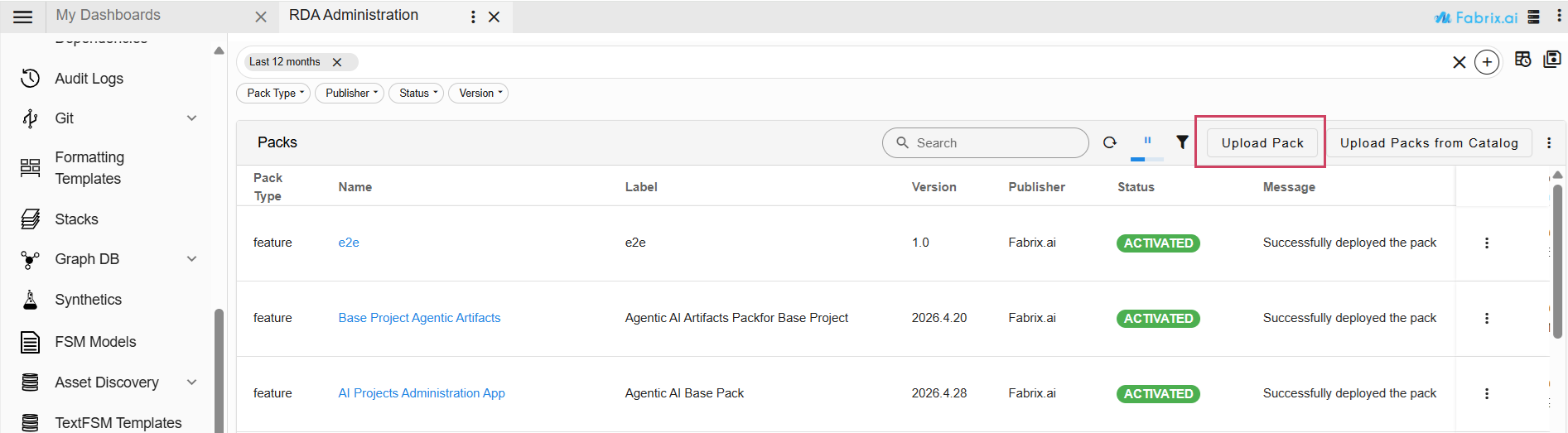
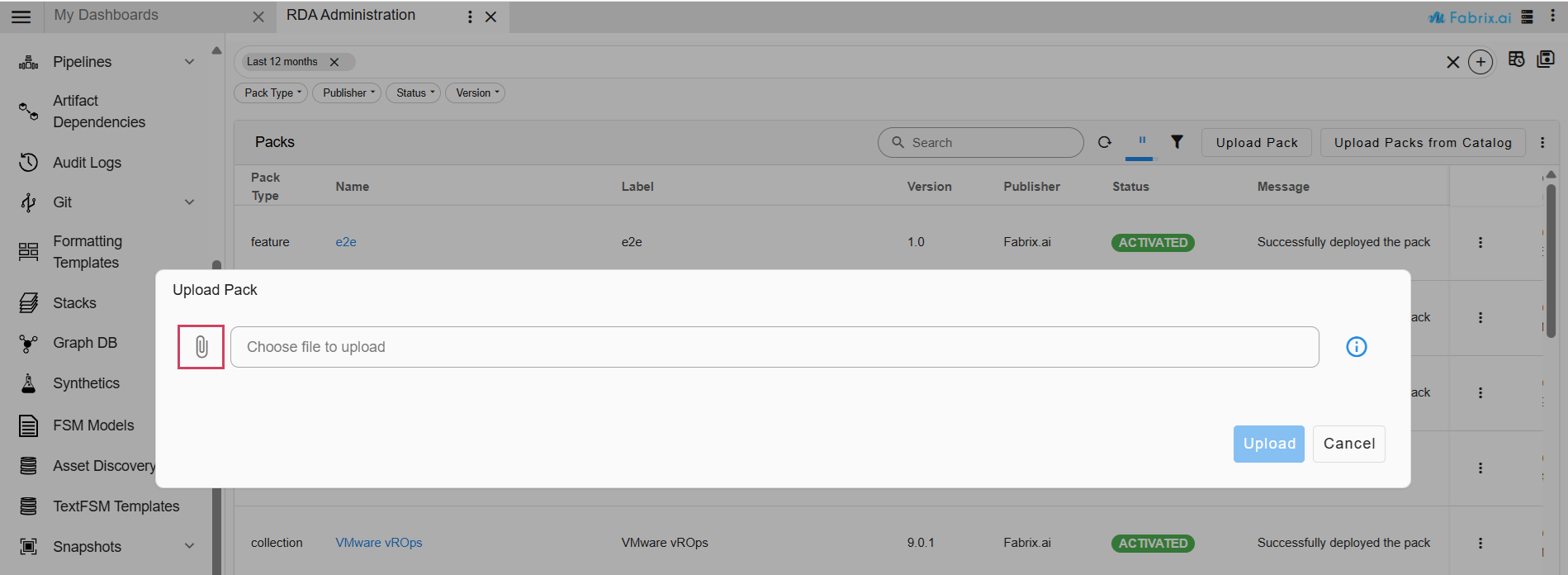
3. Activate the uploaded pack.
Requirements for Base Project Agentic Artifacts Pack
-
Ensure a valid license is added before activating the Base Project Agentic Artifacts Pack. The license can be added by navigating to Main Menu -> Administration → License.
-
Confirm that an organization is set up, along with the required user groups and users.
-
Note that The Base Project Agentic Artifacts pack is supported now for single tenant and multi tenant setups.
4. Navigation Path : Go to Main Menu → Configuration → RDA Administration → Packs → Upload Pack
5. Upload the following pack.
- Pack Name: Base Project Agentic Artifacts
- Pack Version: 2026.06.23
6. Activate this pack as well.
7. After the pack is activated, manually update the Common toolset and the system_instructions prompt template with the versions provided in the latest pack.This step is required to ensure that the latest tool and prompt template updates are applied.
Note
Verify both packs are successfully activated before proceeding to the next steps.
3. Execute Pipelines
Navigation Path : Go to Main Menu → Configuration → RDA Administration → Pipelines -> Draft Pipelines -> Add with Text
Once the packs are activated, run the required pipeline to backfill conversation data. This step is required because the AI Administration → Conversations page will remain empty until the pipeline is executed. Running the pipeline populates the Conversations page with existing conversation records and calculates the corresponding Cost values, enabling the new Cost column to display historical and future conversation costs.
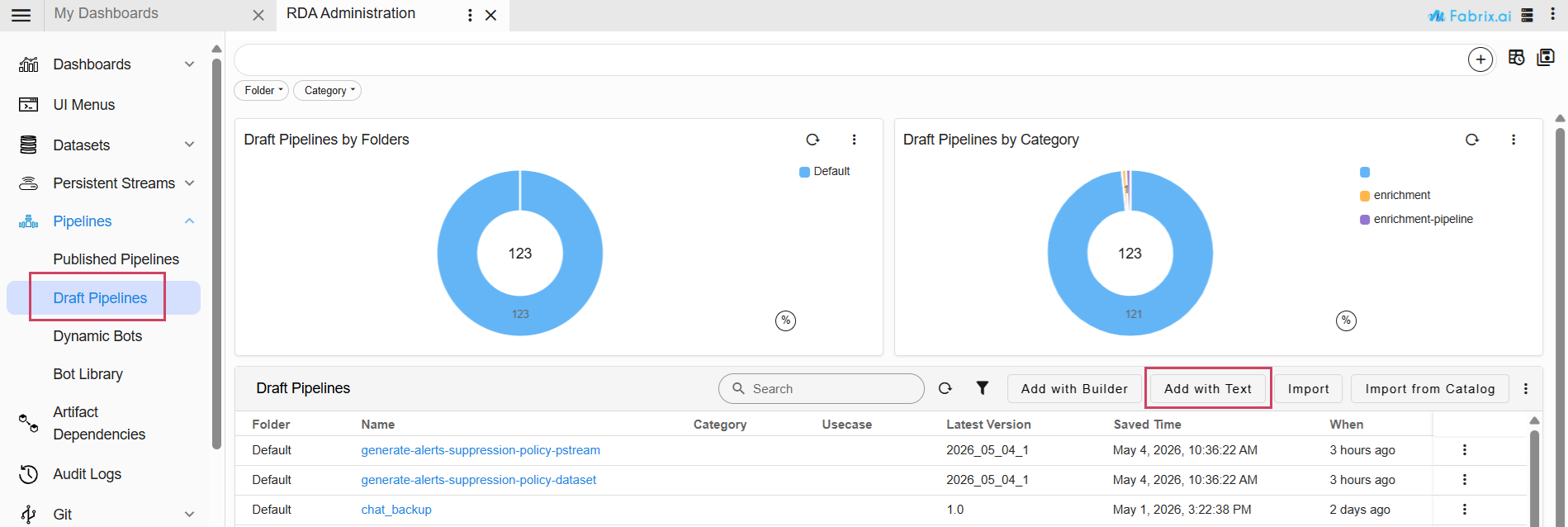
Provide Pipeline Name and Pipeline Version
The pipeline is used to back up previous conversations and shared conversations.
| Field | Value |
|---|---|
| Pipeline Name | conversation_cost_backup |
| Pipeline Version | 1.0 |
%% stream = no and limit = 0

@c:new-block
    --> @dm:query-persistent-stream-iterate-by-chunk name = "rda_chat_sessions" &
            query = "prompt_id is not empty and conversationId is not empty GET token_usage_input_tokens,token_usage_output_tokens,token_usage_cache_tokens,conversationId,prompt_id" &
            batch_size = "5000"
    --> @dm:fixnull columns = "token_usage_input_tokens,token_usage_output_tokens,token_usage_cache_tokens" &
            value = "0" &
            apply_for_empty = "yes"
    --> @dm:to-type columns = "token_usage_input_tokens,token_usage_output_tokens,token_usage_cache_tokens" &
            type = "float"
    --> @dm:selectcolumns include = "^conversationId$|^prompt_id$|^token_usage_input_tokens$|^token_usage_output_tokens$|^token_usage_cache_tokens$"
    --> @dm:save name = "temp-chat_sessions_raw" & append = "yes"

--> @c:new-block
    --> @dm:recall name = "temp-chat_sessions_raw"
    --> @dm:groupby columns = "conversationId,prompt_id" &
            agg = "sum"
    --> @dm:enrich-using-pstream dict = "rda_chat_sessions" &
            query = "type is 'client'" &
            src_key_cols = "conversationId,prompt_id" &
            dict_key_cols = "conversationId,prompt_id" &
            enrich_cols = "message,llm,conversationLabel,ai_project_name,USER_ID,request_type,persona,timestamp"
    --> *dm:filter message is not empty
    --> @dm:rename-columns prompt="message" &
            conversation_id = "conversationId" &
            conversation_label = "conversationLabel" &
            user_id = "USER_ID" &
            total_input_tokens = "token_usage_input_tokens" &
            total_output_tokens = "token_usage_output_tokens" &
            total_cache_tokens = "token_usage_cache_tokens"
    --> @dm:fixnull columns = "total_input_tokens,total_output_tokens,total_cache_tokens" &
            value = "0" &
            apply_for_empty = "yes"
    --> @dm:to-type columns = "total_input_tokens,total_output_tokens,total_cache_tokens" &
            type = "float"
    ## Enrich with per-1M token rates from llm_model_costs.
    --> @dm:enrich-using-pstream dict = "llm_model_costs" &
            src_key_cols = "llm" &
            dict_key_cols = "llm_name" &
            enrich_cols = "input_token_cost_per1M,output_token_cost_per1M" &
            return_empty_cols = "yes"
    --> @dm:add-missing-columns columns = "input_token_cost_per1M,output_token_cost_per1M"
    --> @dm:fixnull columns = "input_token_cost_per1M,output_token_cost_per1M" &
            value = "0" &
            apply_for_empty = "yes"
    --> @dm:to-type columns = "input_token_cost_per1M,output_token_cost_per1M" &
            type = "float"
    --> @dm:eval total_cost = "round((total_input_tokens * input_token_cost_per1M + total_output_tokens * output_token_cost_per1M) / 1000000.0, 4)"
    --> @dm:to-type columns = "total_input_tokens,total_output_tokens,total_cache_tokens" &
            type = "int"
    --> @dm:selectcolumns include = "^conversation_id$|^conversation_label$|^prompt_id$|^prompt$|^persona$|^ai_project_name$|^user_id$|^llm$|^request_type$|^total_input_tokens$|^total_output_tokens$|^total_cache_tokens$|^total_cost$|^timestamp$"
    --> @rn:write-stream name = "rda_chat_conversation_costs"
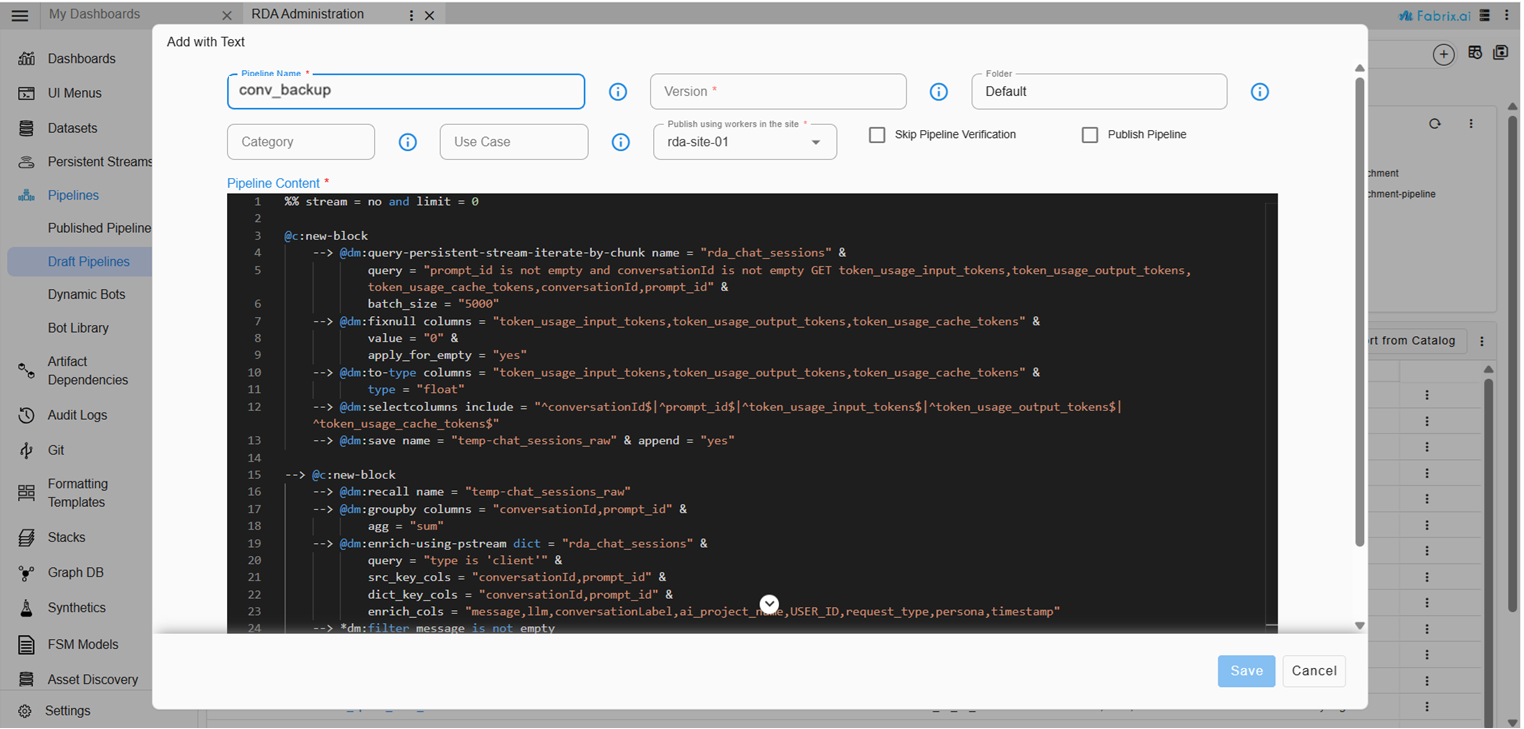
To execute a pipeline, click the three-dot menu corresponding to the pipeline below and select Run. If needed, enable Inspect Pipeline Traces for additional debugging. Ensure that the pipeline completes successfully before proceeding.
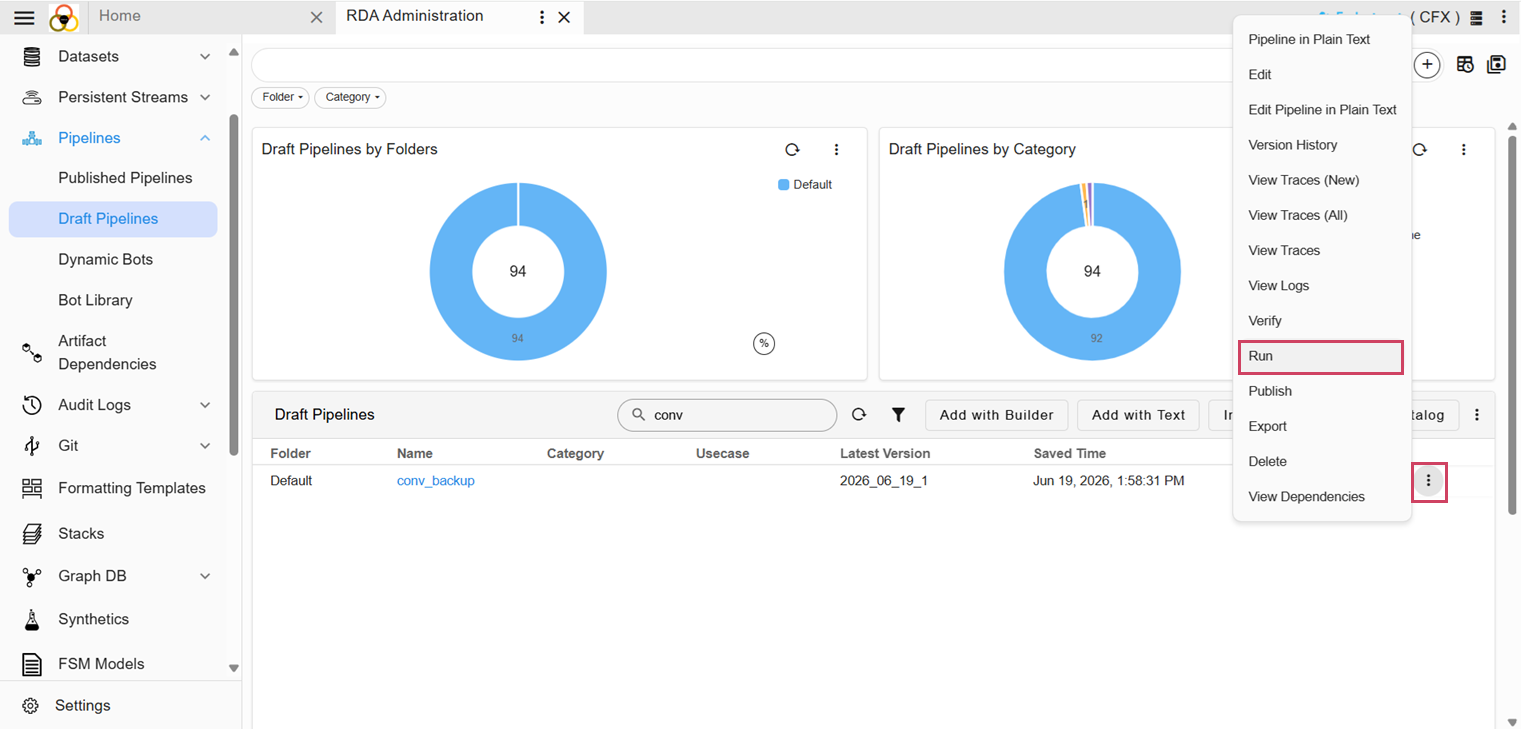
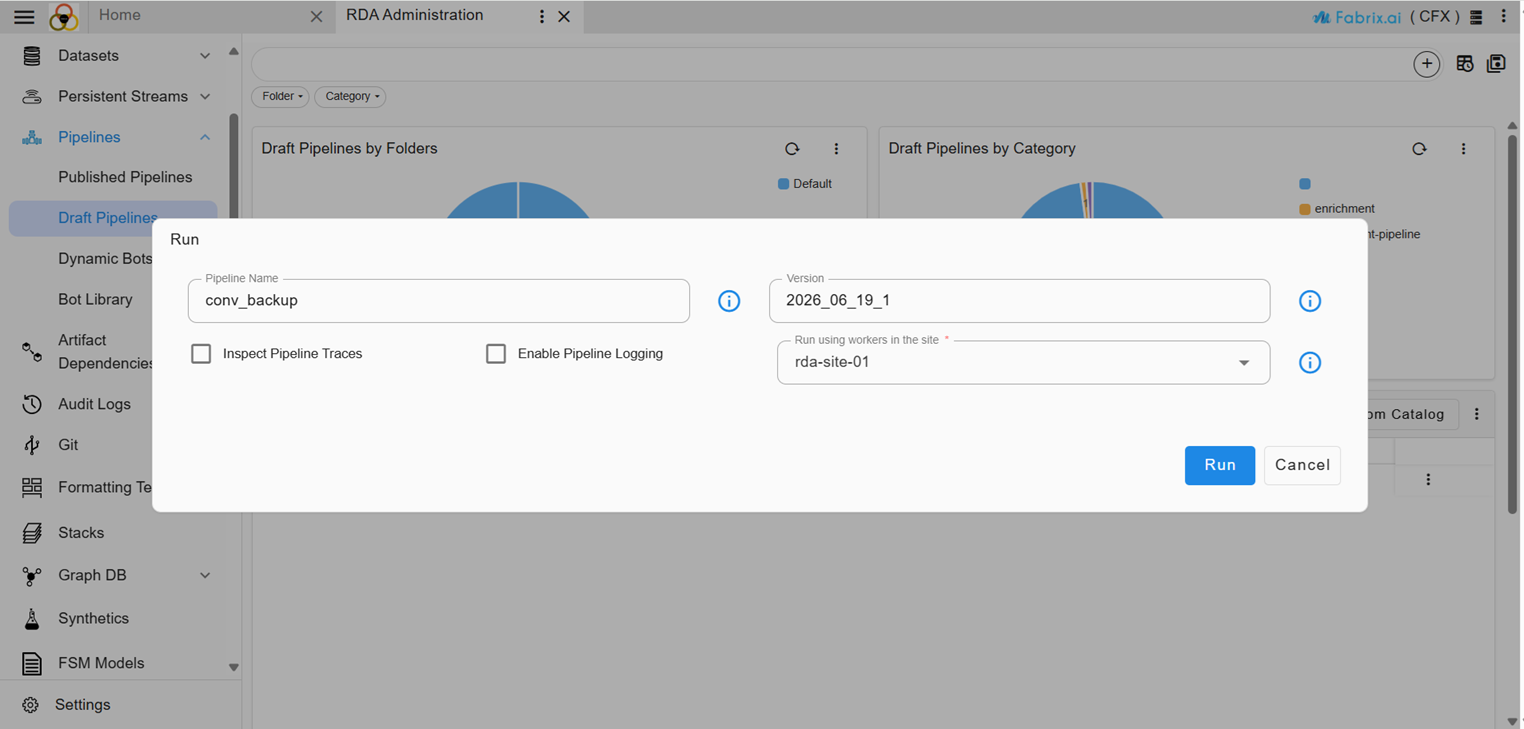
Once the pipeline is executed successfully, both existing and newly created conversations will be populated with the cost per prompt. The AI Administration → Conversations page will display historical conversations along with their calculated costs, and all new conversations will continue to have cost information recorded automatically
Note
1. Update the retention days of rda_chat_sessions stream to 180 days, aligning with the requirement since the previous version of ai_administration_app_projects pack had retention days of 31 days.
llm_model_costs dataset has required data and ingest the dataset to llm_model_costs pstream.
3. Add gpt-4o-transcribe model to integration to make audio feature work.
4. The audio transcription functionality uses GPT-4o Transcribe (Audio-to-Text), and the text-to-speech functionality uses ElevenLabs (Text-to-Audio). Ensure that both credentials are configured and accessible after the upgrade if these features are required.