Grid
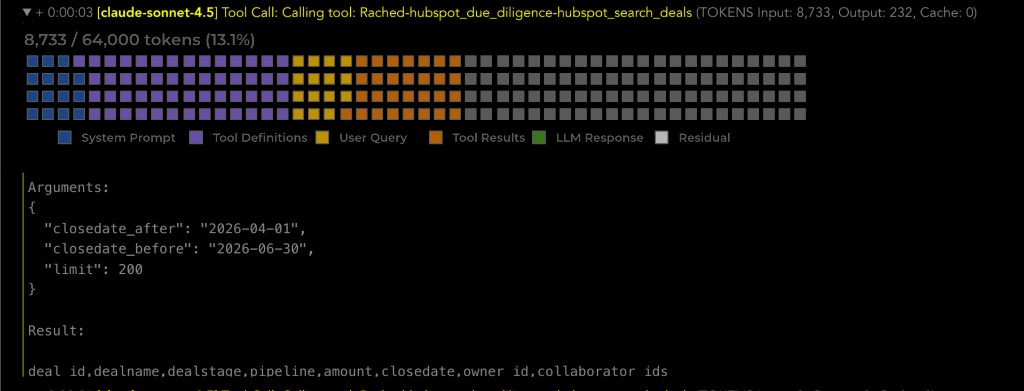
When you expand a tool call or response row in Conversation Details, it shows a visual snapshot of how the model’s context window was composed at that moment in the conversation. The grid appears immediately below the row header, before the tool result.
The grid helps you see what filled the context (system prompt, tools, user message, prior tool output, and so on) and how much capacity remained.
1. What the grid shows
An 80×5 grid (400 cells total) represents the model’s full context window capacity:
- Each cell is 0.25% of that capacity.
- Filled cells are colored by content category and laid out left-to-right, top-to-bottom.
- Unfilled cells (unused context) use a neutral dark color.
- A label above or below the grid shows total tokens and share of capacity, for example: 7,491 / 64,000 tokens (11.7%).
The image below shows an expanded tool call with the grid under the row header.
2. Cell colors and categories
Each filled cell maps to one category of context:
| Category | Color | Source |
|---|---|---|
| System prompt | Blue | full_prompt field |
| Tool definitions | Purple | tools field |
| User query | Green | message from the client row that opened the current turn |
| Tool calls & results | Amber | codeBlocks from prior rows in the current turn |
| LLM responses | Teal | message from prior rows in the current turn |
| Residual / unknown | Grey | token_usage_input_tokens minus the sum of all estimated category tokens above |
3. Legend and token estimates
A compact legend beside the grid lists each category by name and an estimated token count for that slice of the context.

4. Turn boundary detection
A turn is all pstream rows that share the same conversationId between one client row and the next. The client row marks the start of a new turn.
5. Context reconstruction for a clicked row
For the row you expand, context is rebuilt as follows:
| Category | How it is reconstructed |
|---|---|
| System prompt | full_prompt from the clicked row |
| Tool definitions | tools from the clicked row |
| User query | message from the client row that opened the current turn |
| Tool calls & results | codeBlocks from all rows in the current turn with a timestamp earlier than the clicked row |
| LLM responses | message from all rows in the current turn with a timestamp earlier than the clicked row |
| Residual | token_usage_input_tokens minus the sum of all estimated category tokens above |
6. Eligibility
The grid is shown only when token_usage_input_tokens is populated on that row. Rows without token counts—for example hardcoded get_conversation_history or list_prompt_templates_by_persona invocations—do not display the grid.