Skills
When you ask the LLM for something broad—such as “get me alerts and incidents”—the LLM calls the AIOps toolset with many tools (alerts, incidents, metrics, and more). A wide tool surface increases the risk of the model choosing the wrong tool or hallucinating capabilities it does not have.
Skills address this by grouping focused toolsets under named skills. Each skill declares which toolsets belong to it and when the LLM should use that skill. At runtime, only the tools for the relevant skill are loaded for the user’s intent.
Why use skills?
| Without skills | With skills |
|---|---|
| One large toolset with many tools | Separate toolsets per purpose (alerts, incidents, metrics) |
| Higher chance of wrong tool selection | Smaller, intent-specific tool sets per turn |
| Harder to guide behavior in prompts | Skill content describes when and how to use each area |
How to use Skills:
- Create dedicated toolsets—for example
aiops_alerts,aiops_incident, andaiops_metricstoolset. - Create a skill and add only the toolset needed for that purpose.
- Attach skill to a persona so the LLM lists and loads the right skill for each query.
Mandatory toolset: skill_tools
Every skills-based persona also needs the skill_tools toolset. It provides tool to discover and load skill definitions. Without it, skills cannot function.
domain: skill_tools
description: skill_tools
tools:
  - name: get-skill-tool-definitions
    type: getToolDefinitionV2
    description: Returns the full tool definitions for all toolsets whose names match
      the toolset_references patterns stored on the given skill. Use this to discover
      what tools a specific skill is allowed to call.
    parameters:
      - name: skill_name
        type: string
        description: Name of the skill to look up in ai_skills.
        required: true
      - name: ai_project_name
        type: string
        description: Project the skill belongs to.
        required: true
1. Prepare toolsets
Split capabilities by domain instead of one monolithic AIOps toolset:
| Toolset (example) | Purpose |
|---|---|
aiops_alerts |
Alert-related tools (fetch and analyze alerts). |
aiops_incident |
Incident-related tools (count, metadata, details). |
| Metrics toolset | Metrics-related tools (separate from alerts/incidents). |
skill_tools |
Required skill infrastructure (get-skill-tool-definitions, etc.). |
| Common toolset | Shared tools such as list_skills_by_persona (imported from common). |
Each toolset should contain only the tools for that purpose so the LLM sees a smaller, clearer set when a skill loads.
2. Create a skill
In the Skills section of your AI project, click Add skill. The form lets you define the skill and select which toolsets it may use.
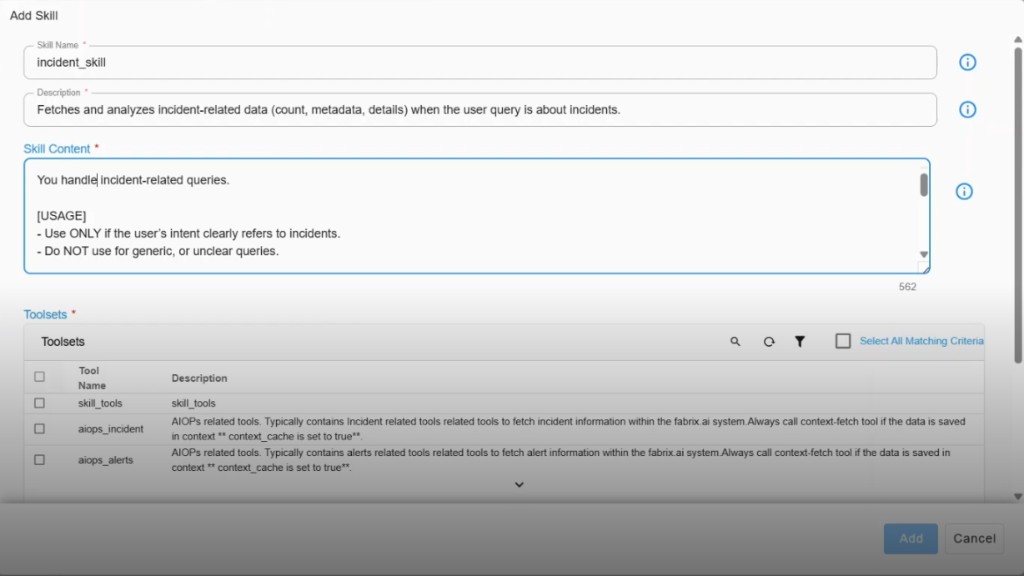
| Field | What to enter |
|---|---|
| Skill name | Short identifier, for example incident_skill. |
| Description | What the skill does, for example: Fetches and analyzes incident-related data when the user query is about incidents. |
| Skill content | Instructions for the LLM: when to use the skill and the expected tool flow (for example call get_skill from the common toolset, then use incident tools). |
| Toolsets | Check the toolsets this skill may load—for an incident skill, select aiops_incident (and ensure skill_tools is available to the persona). |
Example — incident skill
- Name:
incident_skill - Description: Fetches and analyzes incident-related data (count, metadata, details) when the query is about incidents.
- Skill content: States that the skill handles incident-related queries only, with usage rules (for example use only when intent clearly refers to incidents; do not use for generic or unclear queries).
- Toolsets selected:
aiops_incident(andskill_toolsat the persona level).
Example — alert skill
- Name:
alert_skill - Description: Fetches and analyzes alert-related data when the query is about alerts.
- Toolsets selected:
aiops_alerts.
Repeat for other domains (metrics, and so on) as needed.
3. Configure the persona
Create or edit a persona that uses skills—for example “Skill Exploring” for testing.
- LLM and guardrails — Configure as usual.
- Toolset and prompt template policy — In the toolset pattern, include a pattern that matches your skills toolset namespace, for example
skill.*(or the specificskill_tools/ skill toolset name your project uses). This ensures skill-related toolsets are in scope for the persona. - Include skills — In the persona’s Skills section, select the skills to expose—for example both
alert_skillandincident_skill.
Save the persona, then start a new conversation in Fabaio with that persona and model selected.
4. What you see at runtime
Prompt: “get two alerts”
Tool sequence:
list_prompt_templates_by_persona— Resolves prompt templates for the persona.list_skills_by_persona(from the common toolset) — Lists skills on the persona (for example Alert skill and Incident skill).load_tools— Loads the toolsets for the skill that matches the intent (alerts). For an alert query, the alert skill’s toolset is loaded.- Alert tools — For example
get_alertsruns and returns results.
As only the alert skill’s tools are loaded, the model is less likely to call incident or metric tools by mistake.
Prompt: “get one alert and one incident”
get_conversation_history/list_skills_by_persona— Both skills appear in the list.load_tools— Loads toolsets for the skills needed (alert and incident).get_alertsandget_incident(or equivalent) — Each domain’s tools run for its part of the request.
The LLM selects and loads skills based on the user prompt; each skill brings in only its configured toolsets.
5. Short recap
| Topic | Takeaway |
|---|---|
| Problem | Large toolsets increase wrong-tool use and hallucination risk. |
| Approach | Split toolsets by purpose; bundle them into named skills. |
| Required toolset | skill_tools with get-skill-tool-definitions (and related tools). |
| Skill definition | Name, description, skill content (when/how), and selected toolsets. |
| Persona | Toolset pattern includes skill toolsets; persona includes chosen skills. |