Tool alias
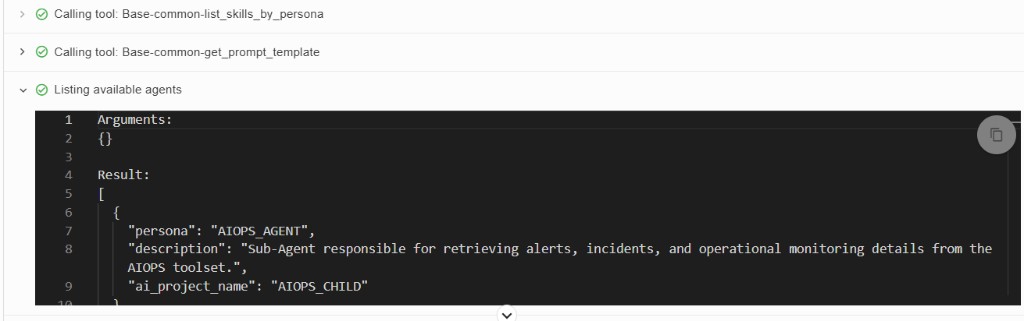
Whenever a tool runs in Fabaio, the chat normally shows a line like Calling tool: tool_name (for example Calling tool: Base-common-list_skills_by_persona). That format is accurate but can feel technical when you want clearer status for operators or end users.
Tool alias lets you replace that default label with a short, human-readable message defined on the tool itself. Only tools where you set tool_alias use the custom text; all other tools keep the usual Calling tool: prefix and internal name.
Tool alias is an optional field on each tool.
1. Add tool alias in the toolset
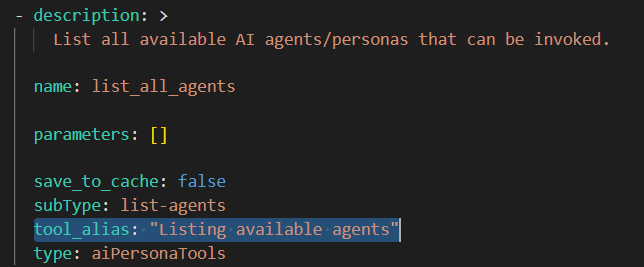
Add a tool_alias attribute to the tool definition in your toolset YAML. The value is the message Fabaio displays when that tool is invoked instead of Calling tool: tool name.
The image below shows a tool named list_all_agents with tool_alias set to "Listing available agents".
2. What you see in Fabaio during a tool call
When the LLM calls a tool without tool_alias, Fabaio shows the default pattern, for example:
Calling tool: Base-common-list_skills_by_personaCalling tool: Base-common-get_prompt_template
When it calls a tool with tool_alias, only your message appears—for example "Listing available agents"—without the Calling tool: prefix or the internal tool name.